


The short answer
Claude Code can do a remarkable share of real engineering work — but only inside a process that keeps it honest. The process that worked for us: give it a project memory → set permission rules → let it explore and audit before it edits → make the tests trustworthy → fix one problem per fresh session, test-first → have a second session review the result → check it yourself like a user → commit after every step.
- It found real problems. A race condition, a leak of students’ emails, broken date rules and tests that only passed by accident.
- It needed checks it could run. Tests, a type-check and screenshots turned “looks done” into “proven done”.
- A fresh session caught what the first one missed. Three real issues, after the implementer said it was finished.
- A human still mattered. Product decisions, a check Claude wasn’t permitted to run, and a screen-reader gap no tool flagged.
The real project behind this guide
In our Manus guide a founder built “Tempo” — a lesson-booking app for a music teacher — with an AI app builder in about 75 minutes of agent time. It works, but it is openly a prototype. That is the most common starting point we see: something that runs, built fast with AI, that nobody has checked for production.
So we gave the same code to Claude Code (version 2.1.286, running Anthropic’s Opus 5.5 model) and asked it to make Tempo production-ready, one step at a time. Each step was a fresh Claude Code session with a written prompt and only the permissions it needed. Between steps we read every change, ran the checks and committed.
- Try the prototype: tempo-demo.nerdheadz.com
- Try the production version: tempo-pro.nerdheadz.com — teacher login
maya@example.com/tempo-pro(test data, resets hourly)
What Claude Code is (and who it’s for)
Claude Code is Anthropic’s AI coding agent. Unlike a chatbot that answers and waits, it reads your project, runs commands like your tests, edits files and works through a problem — asking for permission according to rules you control. You talk to it in plain English.
Where it fits in the three ways to build software today:
- Bootstrap (free): a founder builds a prototype with an AI app builder. See our Manus guide.
- AI with a human in the loop (under $20,000): AI writes most of the code; experienced engineers direct, review, secure and ship it. This is where Claude Code shines.
- Enterprise ($50,000 and up): regulated or large-scale systems, where AI speeds the work but architecture, audits and integration dominate.
More on these worlds in what an app costs in 2026.
Set it up
- Choose a plan. Claude Code needs a paid Claude plan or an API account: Pro is $20 a month ($17 a month billed annually), Max starts at $100 a month, and Team seats include it. The free plan does not.
- Install it. Open a terminal and run the official installer (or download the desktop app if you prefer not to use a terminal).
- Start it in your project. Open the folder your code lives in, type
claude, and follow the browser login once.
$ curl -fsSL https://claude.ai/install.sh | bash
$ claude --version
$ cd your-project
$ claude
$ irm https://claude.ai/install.ps1 | iex
Everything in this guide also works non-interactively — claude -p "your prompt" — which is how we logged every step. In a normal session you type the same prompts into the chat.

Give it a project memory (CLAUDE.md)
Claude Code starts each session knowing nothing about your project. A file called CLAUDE.md in the project fixes that: it is read at the start of every session. Run /init and Claude writes a first version by studying the code.
/init
Keep it short and true. Anthropic’s advice is to ask of every line: “Would removing this cause Claude to make mistakes?” If not, cut it. Check it into git so your team shares it. Our real file is in the starter pack.

Set guardrails before it touches code
Permission rules decide what Claude may do without asking. Put them in .claude/settings.json and commit them. Rules are checked in the order deny, ask, allow — so a deny always wins.
{
  "permissions": {
    "allow": [
      "Bash(npx vitest *)",
      "Bash(npx tsc *)",
      "Bash(git diff *)",
      "Bash(git status)"
    ],
    "deny": [
      "Read(./.env)",
      "Bash(git push *)",
      "Bash(rm *)"
    ]
  },
  "hooks": {
    "PostToolUse": [
      {
        "matcher": "Edit|Write",
        "hooks": [
          {
            "type": "command",
            "command": "jq -r '.tool_input.file_path' | xargs npx prettier --write"
          }
        ]
      }
    ]
  }
}- Allow the safe, repetitive things: running tests and the type-check.
- Deny reading
.env, so your database password is never sent to the model. Our tests loaded it at runtime instead. - Deny
git pushandrm: publishing and deleting stay human decisions. - A hook auto-formats every file Claude edits. Hooks run every time; instructions in CLAUDE.md are only advice.

Explore and audit before changing anything
Anthropic’s recommended workflow is explore → plan → implement → commit. In plan mode(press Shift+Tab until the status bar shows “plan mode on”) Claude reads and reasons but doesn’t edit. We used it twice: once to have the app explained in plain English, once for a production-readiness audit.
Act as a senior engineer doing a production-readiness review of this prototype. Do not change any files.
You may run the type-check and the test suite.
Produce a prioritised list of findings in three groups — Must fix before real users, Should fix soon, Can wait.
For each finding give: the file and line, what is wrong, why it matters for the business in one sentence, and how you would verify the fix.
Check at least: authentication and authorisation on every teacher route, input validation, secrets and config, error handling,
data integrity (double submissions, status transitions), the test suite, and anything that only works because of the prototype environment.
Only report problems you have confirmed in the code — say so if something is a guess.
In 2.5 minutes it returned 20 findings grouped into “Must fix”, “Should fix soon” and “Can wait” — each with a file and line, why it matters for the business, and how to verify the fix. It also said what was fine:
Authentication on teacher routes is fine. All five
teacher.*procedures useteacherProcedure(server/routers.ts:217-262), and so doessystem.notifyOwner. The server rejects requests without a valid session, and checks expiry (server/db.ts:66).

Make the tests trustworthy first
Anthropic’s most important tip is to give Claude a way to verify its work — tests, a build, a screenshot. Without one, “looks done” is the only signal. So before fixing anything we fixed the tests.
The prototype’s suite failed 5 of 10 tests — not because the app was broken, but because the tests were stale and one depended on whatever happened to be running on port 3000. Claude Code made the suite start its own server, load secrets without reading them, and refuse to run against any database not clearly named as a test one.
Before we fix anything, make the test suite trustworthy. Right now 5 of 10 tests fail.
Goal: `npx vitest run` passes on its own, with one command, every time.
- The two stale unit tests (logout, cookie sameSite): check git log to see whether the code or the test is wrong, then fix the right one. The Lax cookie was a deliberate change.
- The acceptance test must not depend on something already running on port 3000. It should start the app itself on a free port and stop it afterwards.
- It must refuse to run unless the database name contains "test" or "walkthrough", so it can never touch production data.
- `.env` holds a throwaway DATABASE_URL and TEMPO_TEACHER_PASSWORD. You are not allowed to read it; load it with dotenv in the test setup.
- Don't change app behaviour in this step. Don't touch approved copy.
Run the suite until it is green, then tell me what you changed and why each failure happened.
One thing I couldn’t check: I didn’t see the database-name guard actually refuse. The command I tried (
DATABASE_URL="mysql://…/tempo_prod" npx vitest run server/tempo.test.ts) wasn’t approved under the permission rules. You can run it yourself…
We ran it. It refused, with a clear message. That honesty — saying what it could not verify — is exactly what you want.
One problem per session, test-first
For each real defect we opened a fresh session (the equivalent of /clear), described the problem and the rule, and asked Claude to write a failing test first, show it failing, then fix it.
Fix audit finding 2: accepting and declining a request can race, because the status check and the update are separate queries.
Work test-first:
1. Write a test that sends an accept and a decline for the same Submitted request at the same time and expects exactly one to succeed and the other to get a clear conflict error. Run it and show me it fails.
2. Make the status change a single conditional UPDATE (only when status is still Submitted) and check the affected-row count.
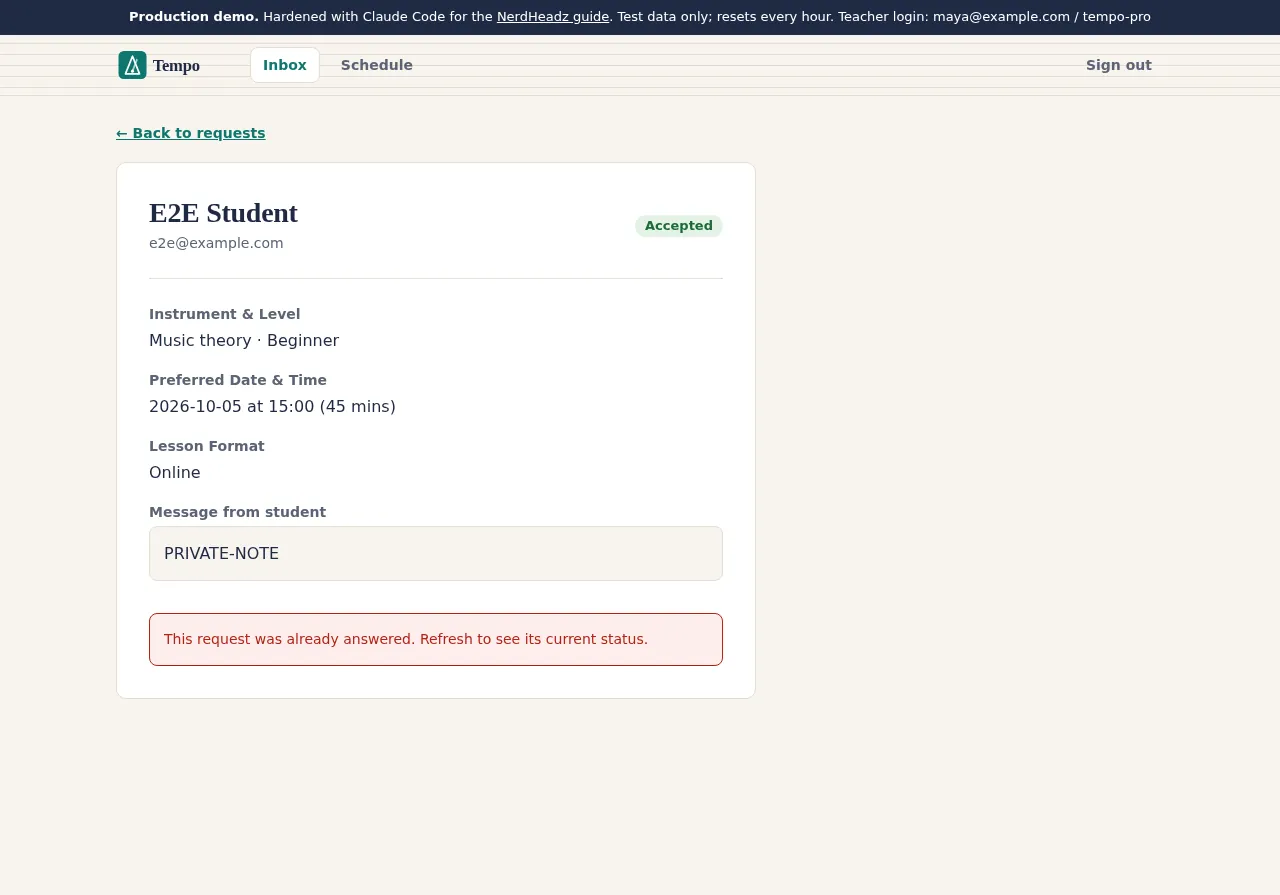
3. Return a proper tRPC CONFLICT error instead of a plain Error, and make the request-detail page show the error instead of failing silently. Use this exact copy for the message: "This request was already answered. Refresh to see its current status."
4. Run the whole suite and the type-check.
Do not change the double-booking rule; that is a product decision for later.
Because the race depends on timing, I changed the test to run 10 pairs at once. The next run reproduced the actual bug:
expected … to have a length of 1 but got 2, meaning both accept and decline returned success for the same request.
- Race condition: a teacher could accept and decline the same request at once and both “succeeded”. Now exactly one wins and the other sees a clear message.
- Privacy: the public confirmation endpoint returned the student’s email and message to anyone with the link. Now it doesn’t; the page still greets the student by email from their own browser.
- Dates: 20 table-driven tests, 13 of which failed on the old code — impossible dates, dates centuries away, and “today” calculated in the wrong time zone, which rejected real evening bookings.

Get a second opinion from a fresh session
Anthropic notes that a fresh context reviews better “since Claude won’t be biased toward code it just wrote”. After the fixes we opened a new, read-only session and asked it to review the whole branch like a senior engineer reviewing someone else’s pull request.
You are a senior engineer reviewing someone else's pull request. Review every change on this branch since commit 129ed74 (`git diff 129ed74`).
Look for bugs, missed edge cases, security problems, tests that don't really test what they claim, and anything that changed behaviour or approved copy without being asked.
Run the tests and the type-check. Report findings ranked by severity with file and line. Say clearly if you found nothing serious. Do not change any files.
I found nothing serious. The three changes the branch is meant to make all look correct… Below that, there are a few medium and low issues, mostly behaviour or copy that changed without being asked for, and some gaps in the tests.
“Nothing serious” — but it was still worth it. It found that after a conflict the teacher’s page stayed stale with live buttons, that the “test database only” safety check would also have accepted names like latest or contest_prod, and that one date boundary was untested. A follow-up session fixed all three, test-first.

Verify like a real user: screenshots and a browser
Tests check logic; they don’t see the screen. For the redesign we gave Claude a small script that screenshots every page at phone and desktop width, and told it to look at the results and keep fixing until every page looked right.
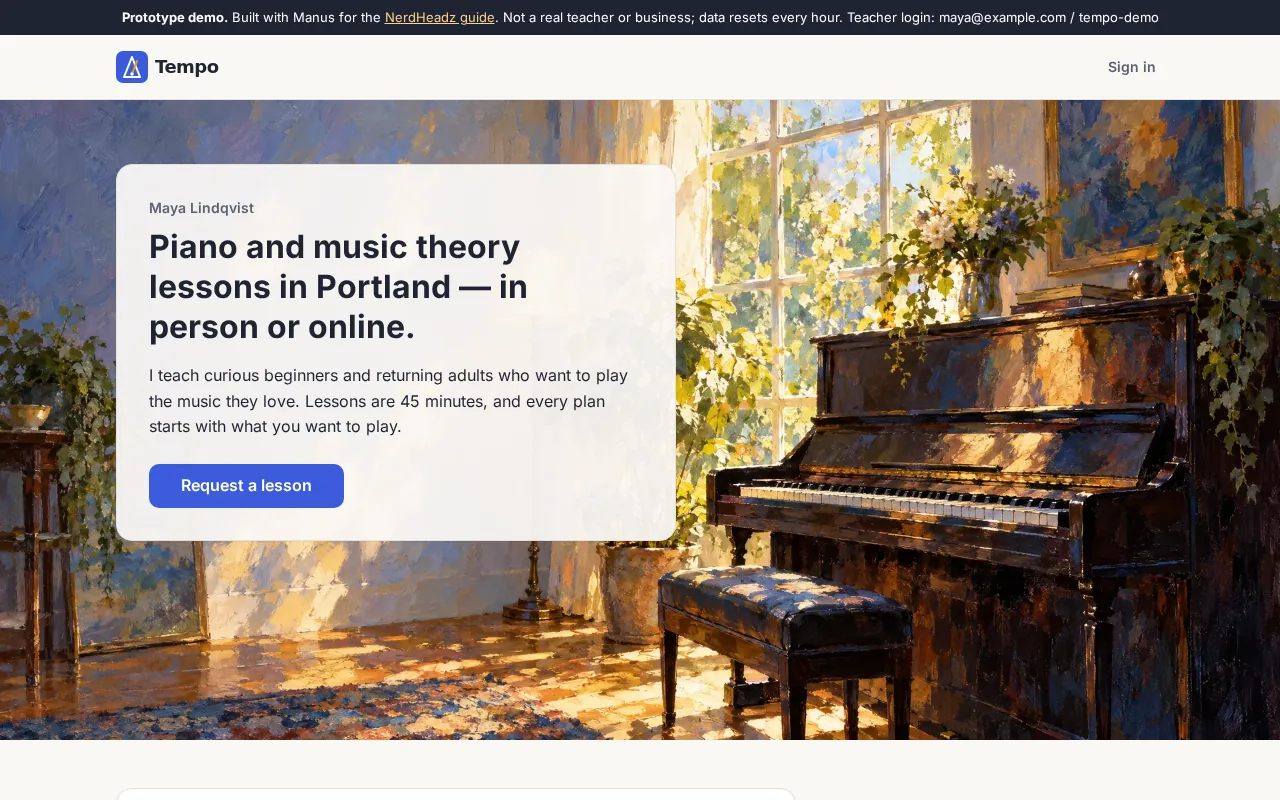
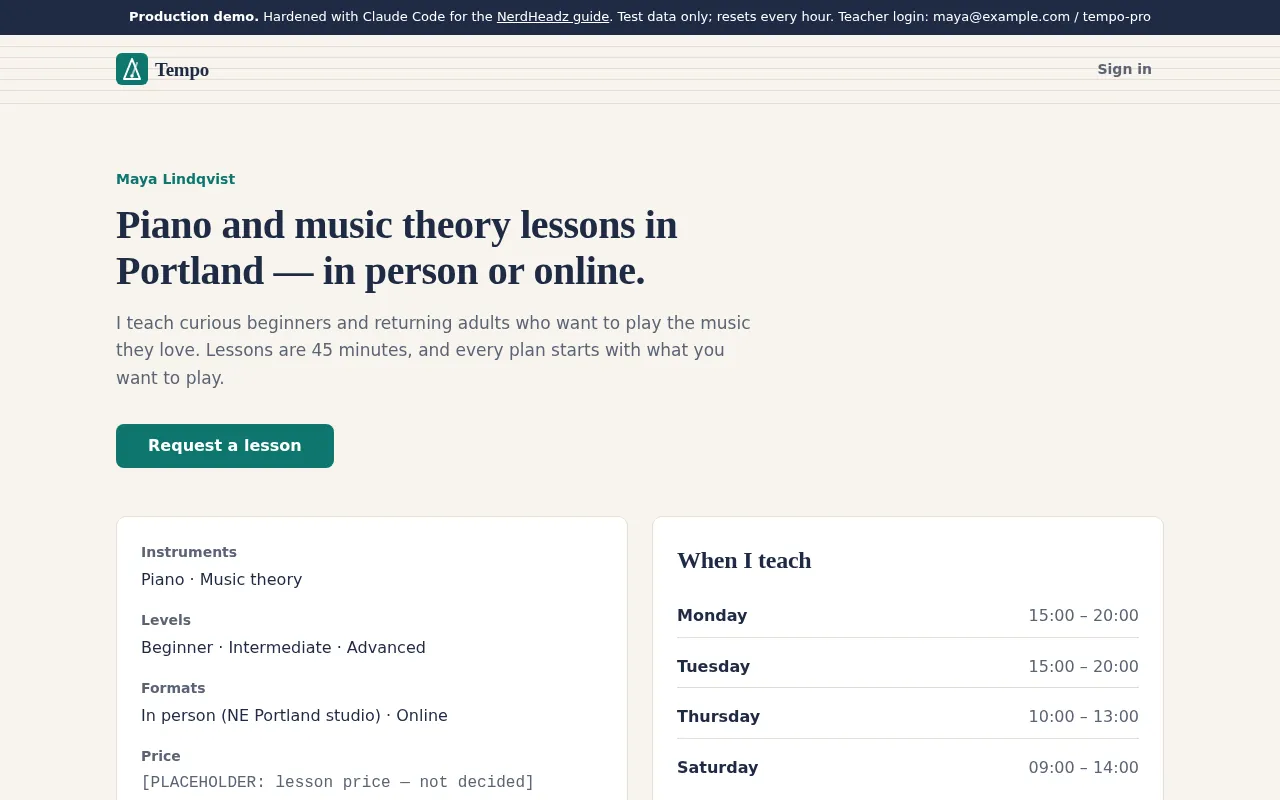
This is now the production version of Tempo, and it needs its own look, clearly different from the AI-builder prototype.
Product decision (approved by the owner): replace the painterly prototype style with a calm, professional "studio" style.

Design brief
- Palette: warm paper background #F7F4EE, cards #FFFFFF with a 1px #E4DED3 border, ink text #1F2A44, muted text #5B6475,
  one accent: deep teal #0F766E (hover #115E59). Keep status colours distinct and at least WCAG AA on their tints.
- Type: headings in a serif system stack (ui-serif, Georgia, "Iowan Old Style", serif); body in the system sans stack
  (system-ui, -apple-system, "Segoe UI", Roboto, sans-serif). Remove the Google Fonts link from client/index.html.
- Remove the decorative paintings everywhere. Instead use one subtle CSS-only motif: thin horizontal staff lines (like a music staff)
  in #E4DED3 behind the page header area. No images.
- Flat, crisp: radius 10px on cards and 8px on inputs/buttons, no heavy shadows. Primary buttons solid teal with white text.
- Change the demo banner text to: "Production demo. Hardened with Claude Code for the NerdHeadz guide. Test data only."
  Keep the rest of the user-facing copy exactly as it is.
- Do not change routes, behaviour, data, validation or tests' expectations.

Work method
1. Look at the current screens first: run `python3 scripts/shoot.py before-claude` and read a few of the PNGs in tmp/shots/before-claude/.
   The app is running at http://127.0.0.1:5191 with hot reload.
2. Put the new values in client/src/lib/brandTokens.ts and the CSS variables, then update the components.
3. Run `python3 scripts/shoot.py after` and READ the screenshots at 390 px and 1280 px. Fix anything that looks broken, cramped,
   low-contrast or inconsistent, and shoot again until every page looks right.
4. Update CLAUDE.md's product-constraint lines about tokens and artwork to describe the new style.
5. Run the test suite and the type-check.
Tell me what you changed and anything you were unsure about.
My first version broke the lines around each nav item and looked wrong in the screenshots, so they now run unbroken behind the text.
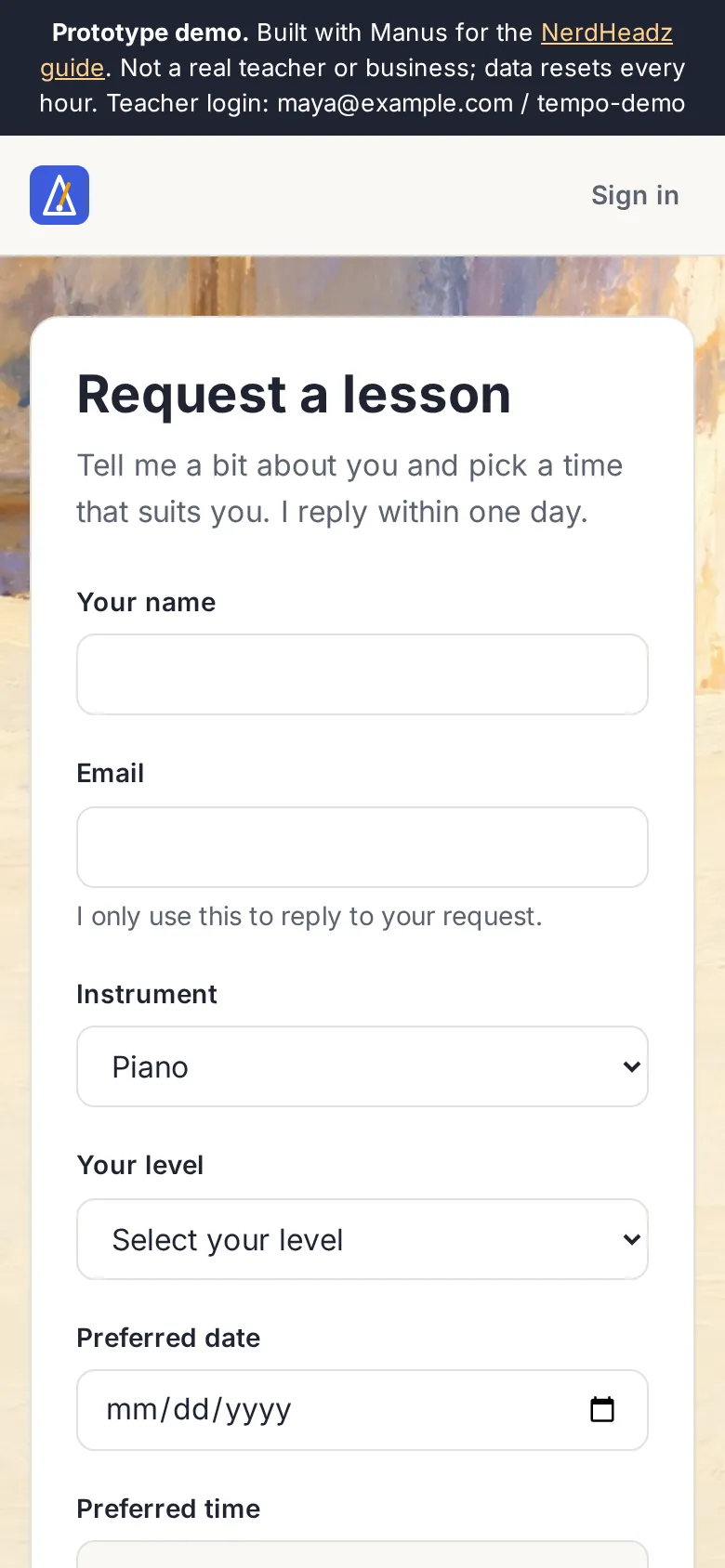
Then we ran our own checks in a real browser: 26 scenarios — booking a lesson on a phone, the two-tab accept/decline race, sign-in and sign-out, impossible dates sent straight to the server, and accessibility scans on every page at two widths. The first run passed 24. The two “failures” looked fine on screen but exposed a real gap: error messages were never announced to screen-reader users. No automated scan flags that, because it only appears after a failed submit. Step 11 fixed it; the re-run passed 26 of 26.
You decide product questions, then commit
The best moments in the run were when Claude Code didn’t guess. When removing the student’s email from the public page also removed their note from the confirmation screen, it said so and asked. When the new 180-day booking limit reused an imperfect error message, it flagged the wording instead of inventing copy.
- Put rules for copy and design in CLAUDE.md (“use the approved copy verbatim”) — it respected them all run.
- Answer the decisions it raises; don’t let them pile up in a long session.
- Read the diff, run the checks, then commit — Claude Code’s checkpoints (
Esc Escor/rewind) are handy, but they are not a replacement for git.
Before and after
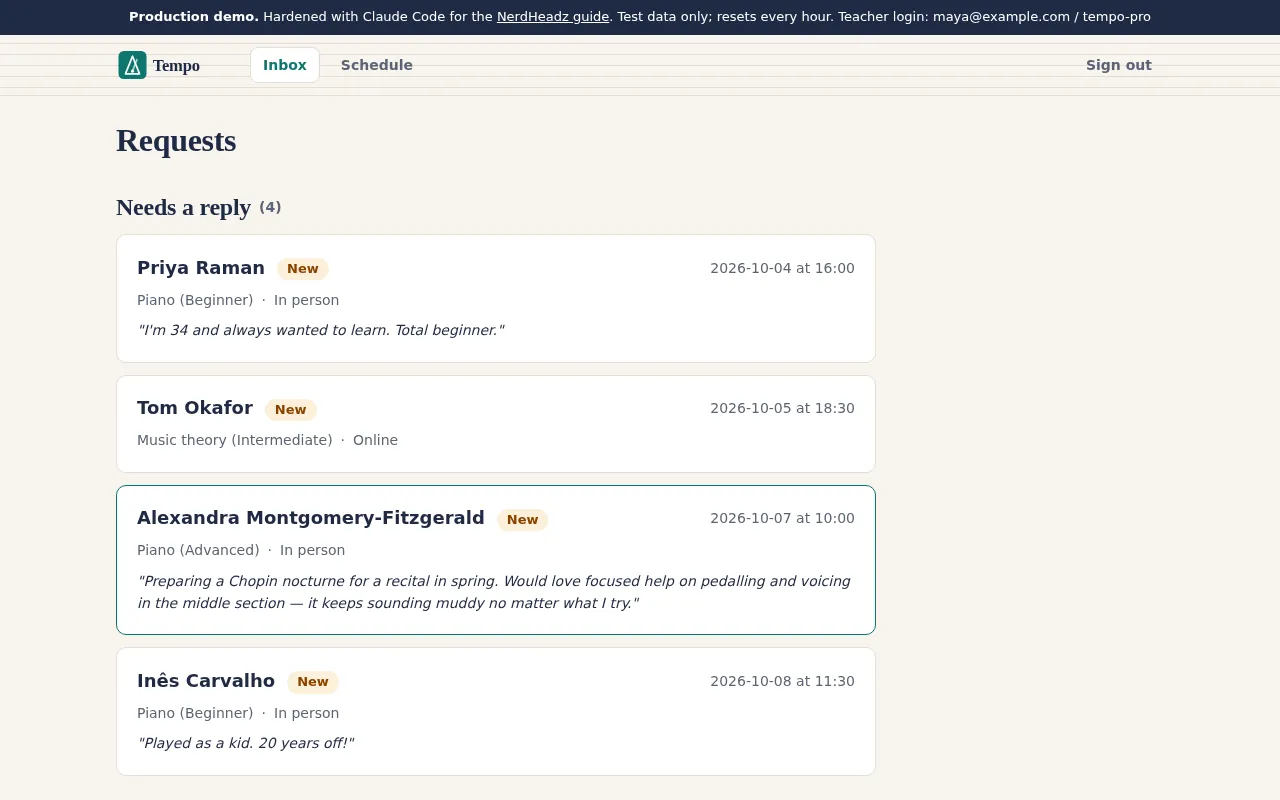
Same app, same copy, same data — two very different products.
Manus prototype
After Claude Code
Manus prototype
After Claude Code
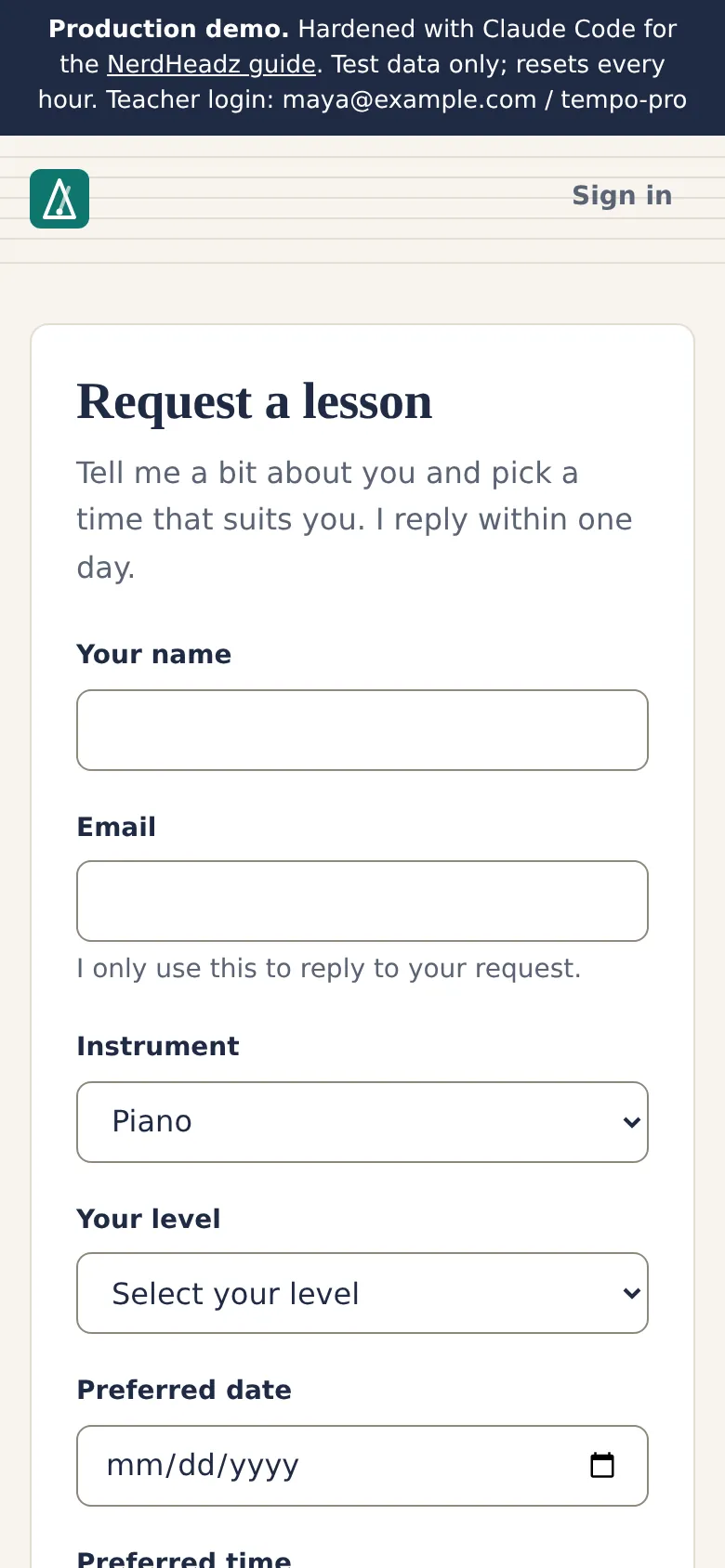
Manus prototype
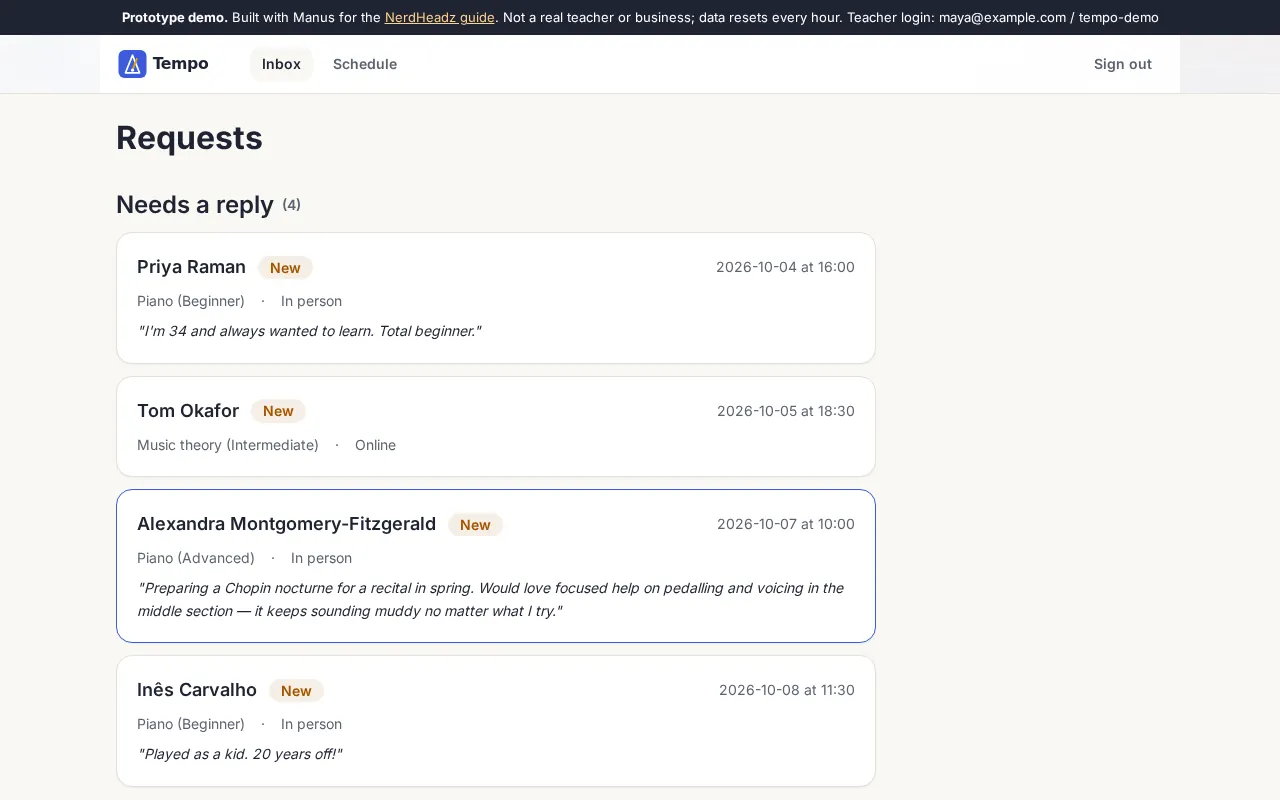
After Claude Code
| Measure | Manus prototype | After Claude Code |
|---|---|---|
| Automated tests passing | 5 of 10 | 42 of 42 |
| Known defects (race, data leak, dates, screen readers) | 4 | 0 |
| Performance score (home) | 64 | 85 |
| Largest content appears after | 10.6 s | 3.5 s |
| Page weight (home) | 2,408 KB | 437 KB |
| Accessibility score | 100 | 100 |
Accessibility scores were already 100 — yet the screen-reader gap was real. Scores are a floor, not a finish line.
Every step, time and cost
| Step | What it did | Time | Cost |
|---|---|---|---|
| 1 · /init | Wrote a 40-line project memory file (CLAUDE.md) | 45s | $0.52 |
| 2 · Explore | Plain-English tour of the app, read-only | 51s | $0.50 |
| 3 · Audit | 20 findings with file and line, read-only | 2m 34s | $0.94 |
| 4 · Tests | Test suite from 5 failing to all passing, safe by design | 1m 25s | $0.58 |
| 5 · Race fix | Accept and decline could both “win” — fixed test-first | 2m 13s | $0.76 |
| 6 · Privacy fix | Public page stopped exposing student emails | 1m 09s | $0.46 |
| 7 · Date rules | Impossible and past dates rejected; teacher’s time zone | 2m 01s | $0.70 |
| 8 · Review | Fresh session reviewed all changes, read-only | 1m 38s | $0.84 |
| 9 · Review fixes | Fixed the three gaps the reviewer found | 1m 17s | $0.46 |
| 10 · Redesign | New visual identity, checked with its own screenshots | 7m 44s | $2.50 |
| 11 · Accessibility | Screen readers now hear form errors | 1m 56s | $0.59 |
| Total | 11 sessions | 23m 33s | $8.86 |
Every prompt above is in the starter pack, in order. The redesign was the most expensive step — design takes many look-fix-look rounds.
What we did by hand
Between Claude Code’s sessions somebody had to read the changes, run the checks and decide. In this walkthrough that review pass was run by NerdHeadz’s own QA tooling — scripted test runs and browser checks driven by our agent — rather than a person clicking through each screen. On client projects, a senior engineer owns that step.
- Set up a separate test database and the permission rules.
- Checked three audit findings in the code before acting on them.
- Ran the one check Claude wasn’t permitted to run.
- Deleted the unused artwork it wasn’t allowed to remove.
- Ran the 26 browser scenarios and Lighthouse; found the screen-reader gap.
- Made the product calls: privacy over the confirmation note, the new visual direction.
Claude’s working time was about 24 minutes. The review, checks and decisions around it took longer — and that is the point.
When to bring in engineers
Claude Code multiplies an engineer. It doesn’t replace the judgement. Bring in experienced people when:
- Mistakes cost money or trust: payments, health or financial data, children’s data.
- You can’t judge the diff: if you can’t tell whether a change is right, you can’t review it.
- It touches real systems: your CRM, accounting, older company software.
- It needs to scale and stay up: monitoring, incident response, maintenance.
Related reading: vibe-coding security risks, a smarter way to prototype AI products and how long an app takes to build in 2026.
NerdHeadz turns AI-built prototypes into production software.
We build with Claude Code and keep senior engineers in the loop on every change. Send us your prototype or your brief — we’ll come back with a scoped proposal within 48 hours.
Frequently asked questions
What is Claude Code?
Claude Code is Anthropic’s AI coding agent. It runs in your terminal (and in a desktop app and IDE extensions), reads your project, runs commands such as tests, and edits files — asking for permission according to rules you set. You describe what you want in plain English; it explores, plans and implements.
How much does Claude Code cost?
It is included in Claude’s paid plans: Pro is $20 a month ($17 a month billed annually), Max starts at $100 a month, and Team seats include it too; the free plan does not. In our walkthrough, Claude Code reported an API-equivalent cost of $8.86 for all 11 sessions — on our Max plan that was covered by the subscription, not billed separately.
Can a non-technical founder use Claude Code?
You can run it — every prompt in this guide is plain English — but the value comes from judging its work: reading what it changed, knowing what to test, and spotting what it did not check. That is why we position it as AI with a human in the loop. Non-technical founders get the most from it alongside an experienced engineer, or by starting with an AI app builder for the prototype.
How is Claude Code different from an AI app builder like Manus?
App builders generate and host a whole app from a description, which is ideal for a prototype. Claude Code works inside a real code repository with your tests, tools and git history, so it fits the next stage: hardening, extending and maintaining software. In this guide we took an app Manus built and used Claude Code to make it production-ready.
Is code written by Claude Code safe to ship?
Not automatically. In our run it found and fixed a race condition, a data leak and date bugs — and a fresh review session still found three issues the implementing sessions had missed, and our own browser checks found a screen-reader gap. Ship it only after tests, an independent review and real-user checks, with permission rules that keep secrets and destructive commands out of reach.
What is CLAUDE.md?
A plain text file in your project that Claude Code reads at the start of every session: commands, conventions and gotchas it cannot work out from the code. Run /init to generate a first version, then keep it short and correct — Anthropic suggests asking of each line whether removing it would cause mistakes.
How long does it take to see results?
In our walkthrough Claude Code worked for about 24 minutes across 11 sessions to audit the app, fix four real defects, make the tests trustworthy, redesign the interface and fix an accessibility gap. Reviewing each change and running the checks between sessions took longer than Claude’s own working time — and that review is the part you should not skip.
Sources
Claude Code documentation and pricing were checked on 2 October 2026; products change, so re-check before relying on a detail.
- Claude Code — best practices
- Claude Code — setup and authentication
- Claude Code — permissions
- Claude Code — hooks
- Claude Code — CLAUDE.md and memory
- Claude Code — non-interactive mode
- Claude — pricing
Related: build an app with Manus AI · app costs in 2026 · AI-assisted development · MVP development