


The short answer
You can build a working first version of an app with AI without writing code — but not by typing “make me an app”. The reliable process is: write a one-page brief → let Manus plan → answer its questions → build → test it yourself in a browser → fix one problem at a time → publish.
- Cost: our full build used 1,802 credits — under half of the $20 Pro plan’s 4,000 monthly credits. Web app total: about $20–35 including a domain.
- Time: about 75 minutes of the agent working; 3–5 hours of yours, most of it writing the brief and testing.
- The catch: Manus said all its checks passed while one screen was completely blank. You are the final tester.
- Native app stores are a separate step with their own fees and review times — start with a responsive web app.
The real build behind this guide
Guides about AI app builders usually describe what should happen. We wanted evidence, so on 1 October 2026 we built Tempo, a small but real app, with Manus and recorded everything: the exact prompts, Manus’s replies, its credit counter after every step, and every defect.
Tempo is a lesson-request app for a (fictional) independent piano teacher, Maya. Students see her profile and availability and request a lesson; Maya signs in, accepts or declines requests and sees her schedule. It is deliberately the shape of most first apps: a public page, a form, a private dashboard and one simple workflow.
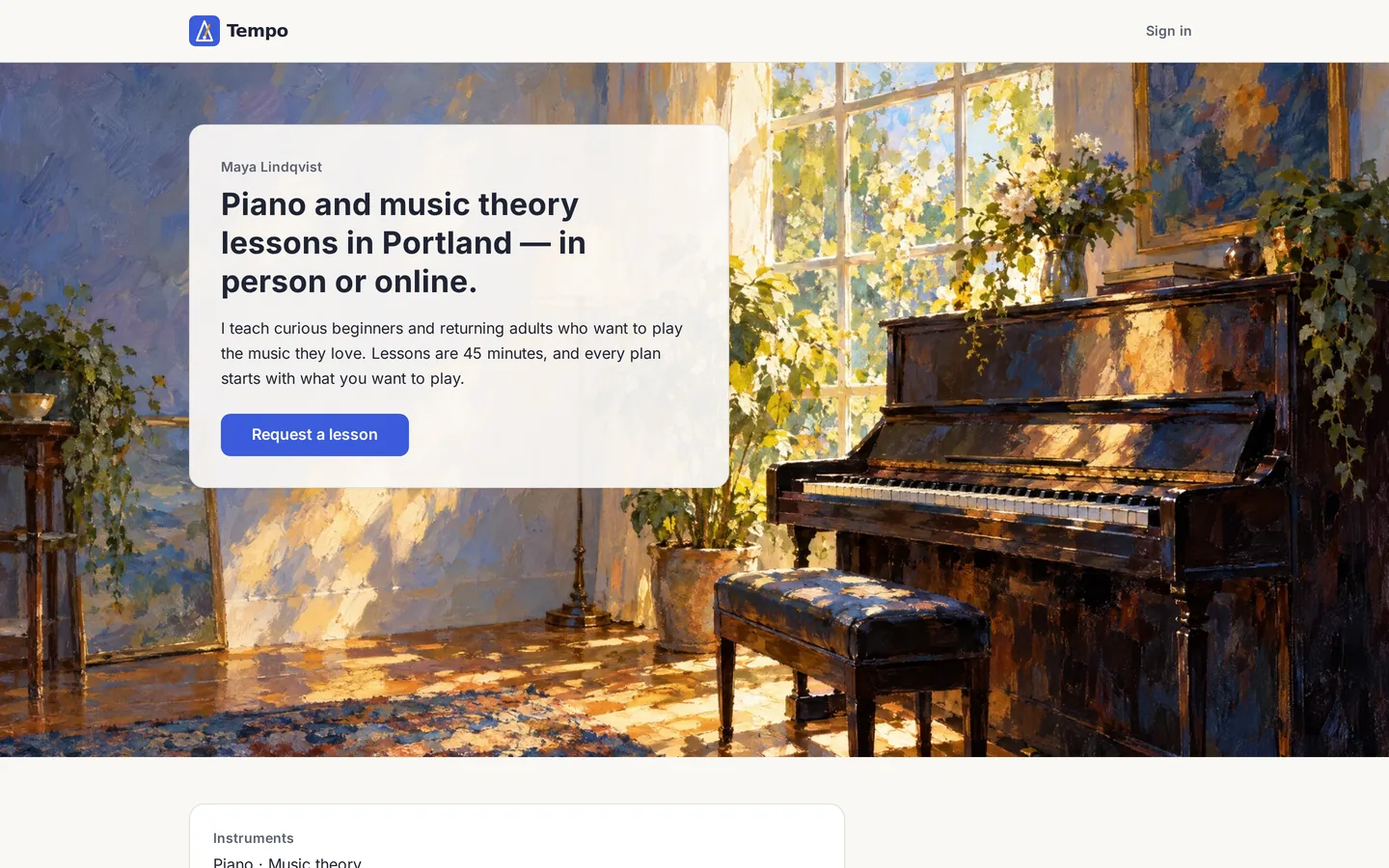
Try the Tempo prototype yourself
Request a lesson as a student, then sign in as the teacher with maya@example.com / tempo-demo to accept or decline it. It is a shared demo: anyone can change the data, and it resets every hour.
This is a prototype, not a production app
Tempo is a design prototype. It exists to show how a non-technical founder can shape, test and approve an app’s design with AI — and to give you something real to click through and show to users, co-founders or investors. It is not production-ready software, and we deliberately did not make it one.
The prototype cost about $9 of Manus credits. Running the same idea as a real SaaS business costs many times more money and effort, because a product that takes money and stores customer data has to be engineered, not just generated:
| Area | Prototype (Tempo) | Real product needs |
|---|---|---|
| Payments | None — price is a placeholder | Stripe or similar, subscriptions, refunds, invoices, tax, failed-payment handling |
| Accounts & security | One shared demo login | Real sign-up and password reset, different user roles, protection against attacks, and a professional security test |
| Data & privacy | Made-up sample data | Backups, encryption, a privacy policy, and following privacy laws such as GDPR |
| Hosting & speed | A small demo server | Hosting that stays fast and online under real traffic, with monitoring and alerts |
| Communication | No emails | Transactional email and SMS, deliverability, notification preferences |
| Operations | Nobody on call | Admin tools, support workflow, error tracking, uptime commitments |
| Maintenance | Frozen | Regular updates, bug fixes, new features, and another engineer checking code before it ships |
That is not a reason to skip the prototype — it is the reason to start with one. A prototype lets you settle the design, the flows and the wording cheaply, and test them with real people, before you pay for engineering. See our MVP vs prototype guide for where each fits.
What it actually costs to build an app with Manus
Manus charges in credits. The free tier gives 300 credits a day but does not let you put a website online; the Pro plan starts at $20 a month with 4,000 credits (a $40 tier gives 8,000 and a 7-day trial), according to Manus’s pricing page. Credits pay for the agent’s work; keeping your app online costs no credits, and hosting comes with a monthly allowance (usage and pricing).
| Item | Cost | Needed? |
|---|---|---|
| Manus Pro, one month | $20 (4,000 credits) | Yes — putting the app online needs a paid plan |
| Our whole Tempo build | 1,802 credits ≈ $9 of that plan | Measured |
| Custom domain | ~$10–15 a year | Optional; needs an active subscription to stay connected |
| Hosting at low traffic | Included allowance | Manus lists small sites as “subscription only” |
| Apple Developer Program | $99 a year | Only for an iOS App Store app |
| Google Play developer account | $25 one-time | Only for an Android Play Store app |
Bottom line: a responsive web app costs about $20–35 in the first month. Even with both app stores you land around $160 — under $200 — but store review and testing rules add days or weeks, so ship the web version first. For the broader picture, see our guide to how much it costs to develop an app.
How long it takes
The agent is fast. Your time goes into deciding and checking.
| Phase | Your time | Agent time in our build |
|---|---|---|
| Write the brief (step 1) | 60–90 min | — |
| Project setup + plan review (2–3) | 20–30 min | ~2 min |
| First build (4) | wait, ~5 min of answers | ~18 min |
| Testing in a browser (5) | 45–60 min | — |
| Fixes and design changes (6–7) | 30–45 min | ~50 min |
| Publish, domain, export (8) | 15–20 min | a few minutes |
Agent times are measured from our run. Founder times are our planning estimates for a first-timer. Compare with how long a traditionally built app takes.
Before you start
- A Manus account on the Pro plan (putting your app online is a paid feature).
- One sentence on who the app is for and what they must be able to do.
- Your logo as an SVG or PNG, your brand colours and font — or accept sensible defaults.
- Made-up sample data. Never upload real customer records to build a prototype.
- A notes file for decisions. You will answer questions; write the answers down.
- The Tempo starter pack — every file we gave Manus, ready to adapt.
Words you’ll meet in this guide
You don’t need a technical background. These are the only terms worth knowing:
- Prototype
- A working model of your app to test ideas and designs with real people. Not built for paying customers yet.
- MVP
- “Minimum viable product”: the smallest real version of your product that customers can actually use.
- Prompt
- The message you type to the AI. In this guide every prompt is ready to copy.
- Credits
- Manus’s pay-as-you-go units. Each request uses some; the $20 plan includes 4,000 a month.
- Brief
- A one-page description of what your app must do, for whom, and what it must not do.
- Plan Mode
- Manus writes a plan and waits for your OK before building anything.
- Database
- Where the app stores information, like the lesson requests in our example.
- Sample data
- Made-up records (names, dates, messages) so the app looks realistic. Never use real customers.
- Done-check
- A simple test you run yourself: “if I do this, I should see that.” Developers say “acceptance criteria”.
- Defect
- A bug: something that doesn’t work the way your brief says it should.
- Checkpoint
- A saved version of your app that you can go back to.
- Publish
- Put a version of your app on the internet at a real web address.
- Domain
- Your own web address, like yourstartup.com. About $10–15 a year.
- Export / GitHub
- Downloading your app’s code, or storing it on GitHub, so developers can take it further.

Write a one-page brief (the step that decides everything)
A logo and a website tell Manus how your business looks. They don’t tell it who can do what, which data the app stores, or what happens when something fails. Those decisions are yours — if you leave them out, the AI fills them with plausible guesses. Our brief for Tempo fit on one page and covered:
- Promise and success: “a new student can request a lesson in under 2 minutes; the teacher can accept it from a phone in under 30 seconds.”
- What’s in and what’s out: five things it must do; payments, student accounts, reviews and app stores explicitly out.
- Pages: every screen, who can see it, and its main button.
- Who can do what: a tiny table of who can see, add and change each thing. If in doubt, nobody can.
- Information you store: each field (name, email, date…), whether it’s required, and how a status can change — e.g. “New” can become “Accepted” or “Declined”.
- What happens when things go wrong: a missing field, a double-click on “Send”, someone who isn’t signed in.
- Done-checks: four simple “if I do this, I should see that” tests you’ll run yourself (developers call these acceptance criteria).
Alongside it we gave Manus a one-page style sheet (our colours, font sizes and spacing), the approved copy for every screen, made-up sample data and a list of decisions. If you’re unsure what belongs in a first version, read our MVP guide and MVP vs prototype.
Set up a Manus Project with a master instruction
In Manus, create a Project for your app. A Project is a folder for your app: it holds standing instructions and your files, and every conversation (Manus calls them tasks) inside it can use them (Manus Projects). Upload your brief files, then paste a short set of rules into the instruction field. This is ours:
You don’t need to understand every word of a prompt. Copy it, replace the parts specific to our example (Tempo, music lessons) with your own, and paste it into Manus.
You are building Tempo, a lesson-request web app for one independent music teacher.
Source of truth, in this order: DECISIONS.md, 00-founder-brief-v1.md, 04-approved-copy.md,
01-brand-tokens.md. Read them before every task.

Rules:
- Build only what the brief lists as in scope. If something seems missing, ask; do not add it.
- Use only the colours, type sizes, spacing, radii and shadows in 01-brand-tokens.md.
- Use the copy in 04-approved-copy.md verbatim. For anything missing, show a visible
  [PLACEHOLDER: …]. Never invent prices, legal text, privacy promises or testimonials.
- Mobile-first. Every screen must work at 390 px wide without sideways scrolling.
- Every form field has a visible label. Errors appear as text next to the field.
- When you change something, list every page and component you touched.

Make Manus plan before it builds
Never let the first message be “build it”. Turn on Plan Mode (type / and choose Plan; it’s available to every user — Manus) or simply say “plan only”. Then read the plan as a contract.
Plan only; do not build yet.

Use the Tempo Project files as the source of truth. Return:
1. The MVP scope in your own words
2. Assumptions and open questions
3. Routes and navigation (desktop and mobile)
4. Who can see and do what
5. Data: LessonRequest and Availability, with statuses
6. Every screen and its states: empty, loading, error, success, mobile
7. Reusable components and how they use the brand tokens
8. How each acceptance criterion (AC-01 to AC-04) will be met
9. What you will NOT build

Seed the app with 07-sample-data.csv. Wait for my approval before building.
The plan is complete and no app has been built. … Before implementation, please resolve or approve placeholder handling for:
- Teacher authentication method and initial credential.
- Preferred-time rules (slot interval and whether a 45-minute lesson must fit before availability ends).
- Missing sign-in UI copy.
- Seeded request ordering / created_at convention.
- Direct access behavior for /request/sent.
Those questions are product decisions. We answered each one as a numbered decision (D-005 to D-009) and added one correction the plan had missed — there was no “Sign out”. Then we approved:
Approved with my edits. Build MVP v1 only. Seed the sample data.
When finished, list the routes so I can test each one.
Ours was followed by the five answers — e.g. “D-006: students choose 30-minute start times; a 45-minute lesson must end within the availability window.” All of them are in the starter pack’s DECISIONS.md.

Let it build the first version
After approval Manus built a complete web app: seven pages, a database to store the requests, a password-protected teacher area, our sample data and a set of automatic tests. When it needed the teacher’s password, it asked for it as a secret — stored in a locked vault instead of being written into the app’s code. Say yes to that every time.
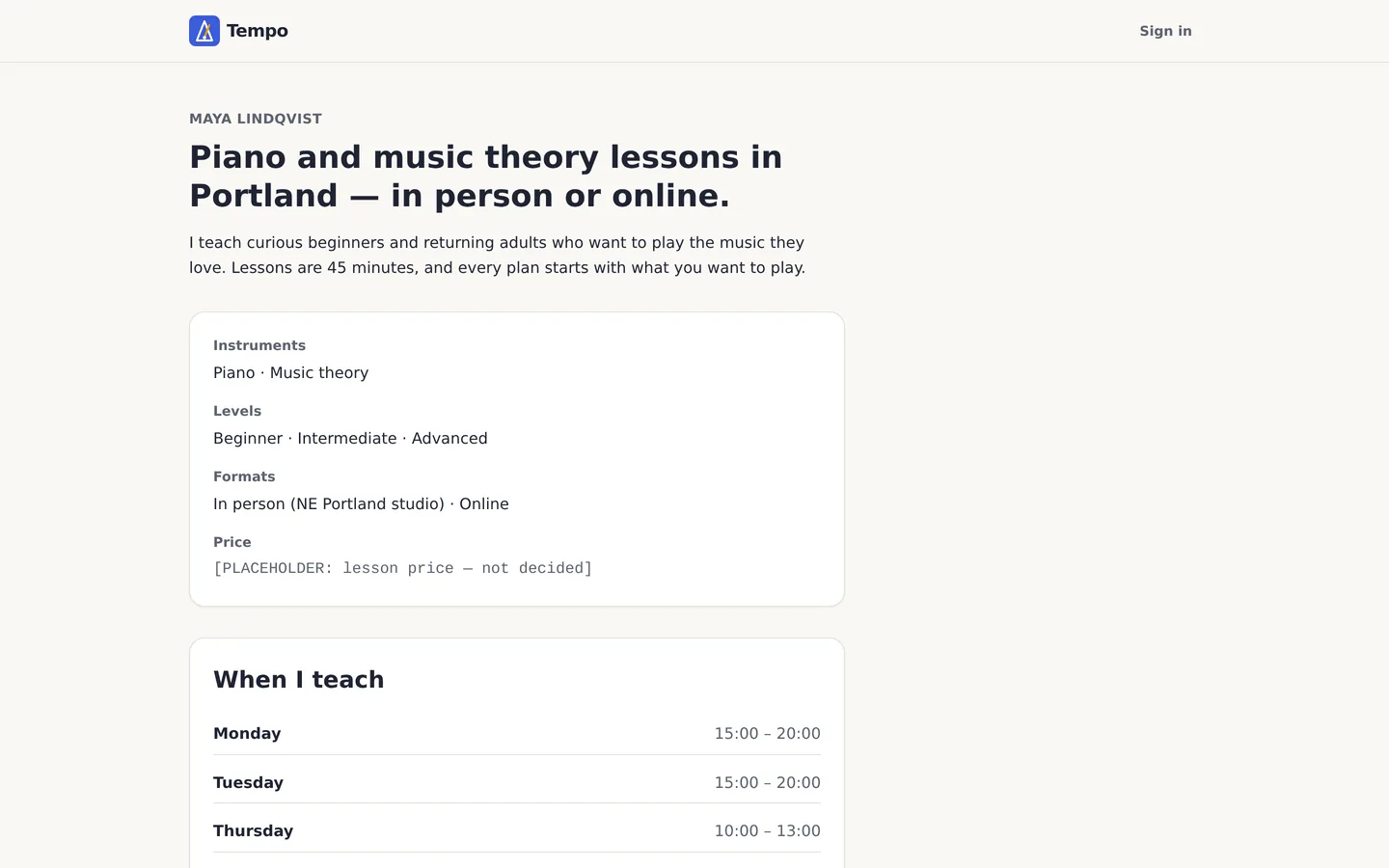

Test it like a stranger would
This is the step most people skip, and the one that matters most. Open the preview in a normal browser and walk every flow from your brief — on desktop and at phone width — as a student, as a signed-out visitor and as the teacher. Try to break it: empty form, invalid email, double-click, the back button.
- Open every page the agent listed. Any blank page or error message is a defect (a bug).
- Submit the form empty, then with bad input. Errors must appear next to the field, in words.
- Sign out and try the private pages. You must be sent to sign-in.
- Open it on your phone, or shrink your browser window to phone size. Nothing should scroll sideways.
- Check the data: is anything there that you didn’t put there?

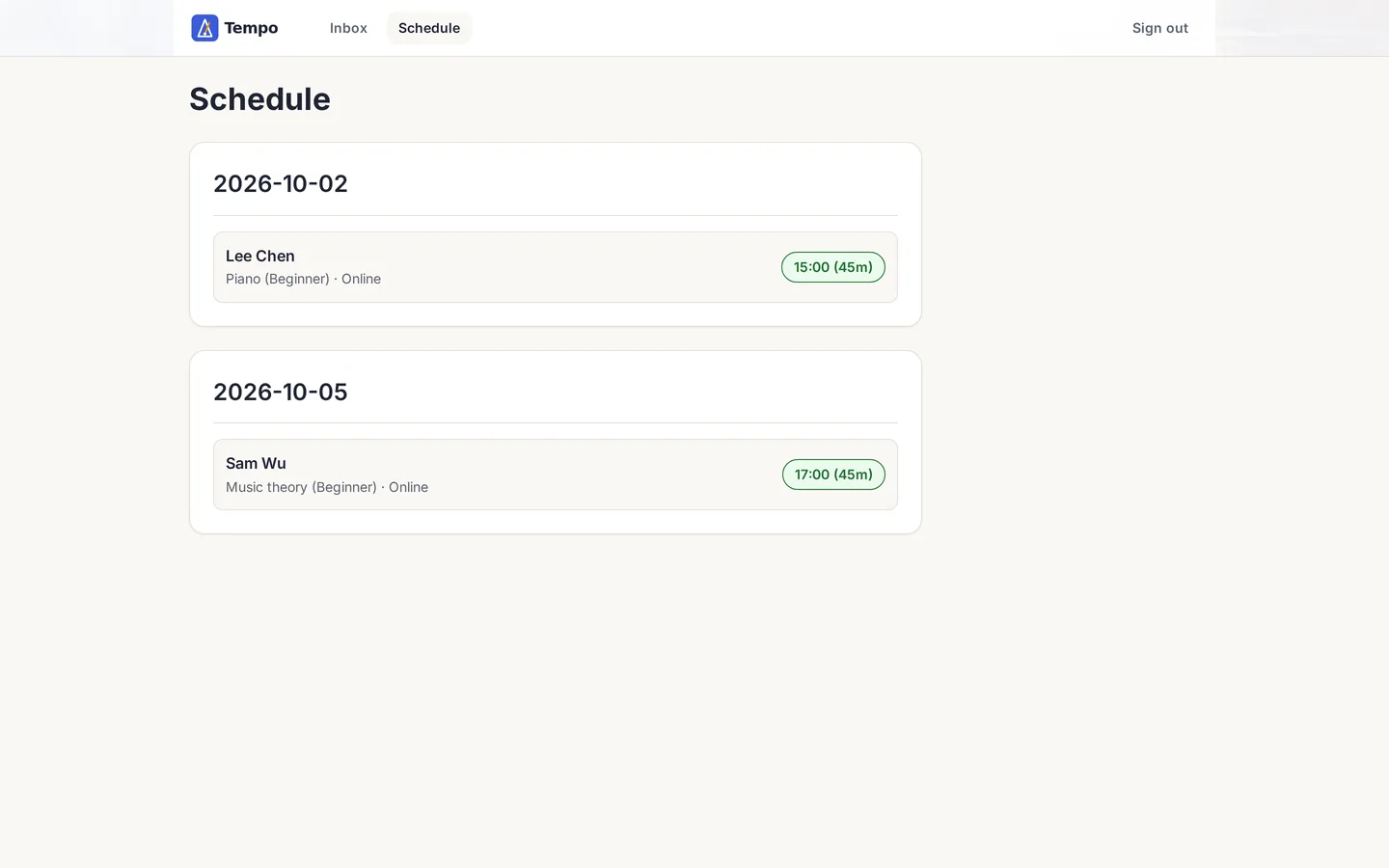
We found three real defects in total:
- D-1: a fake “Test Student AC01” left in the teacher’s inbox by Manus’s own test run.
- D-2: the blank schedule page above.
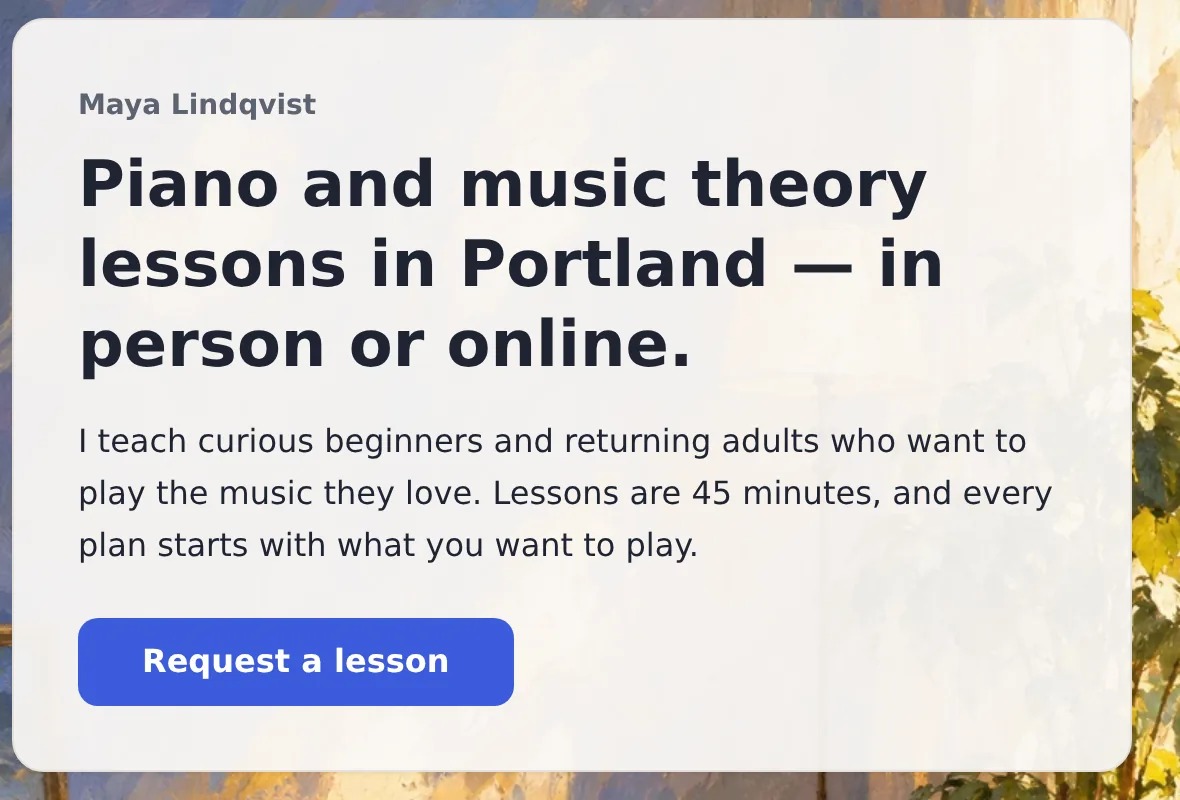
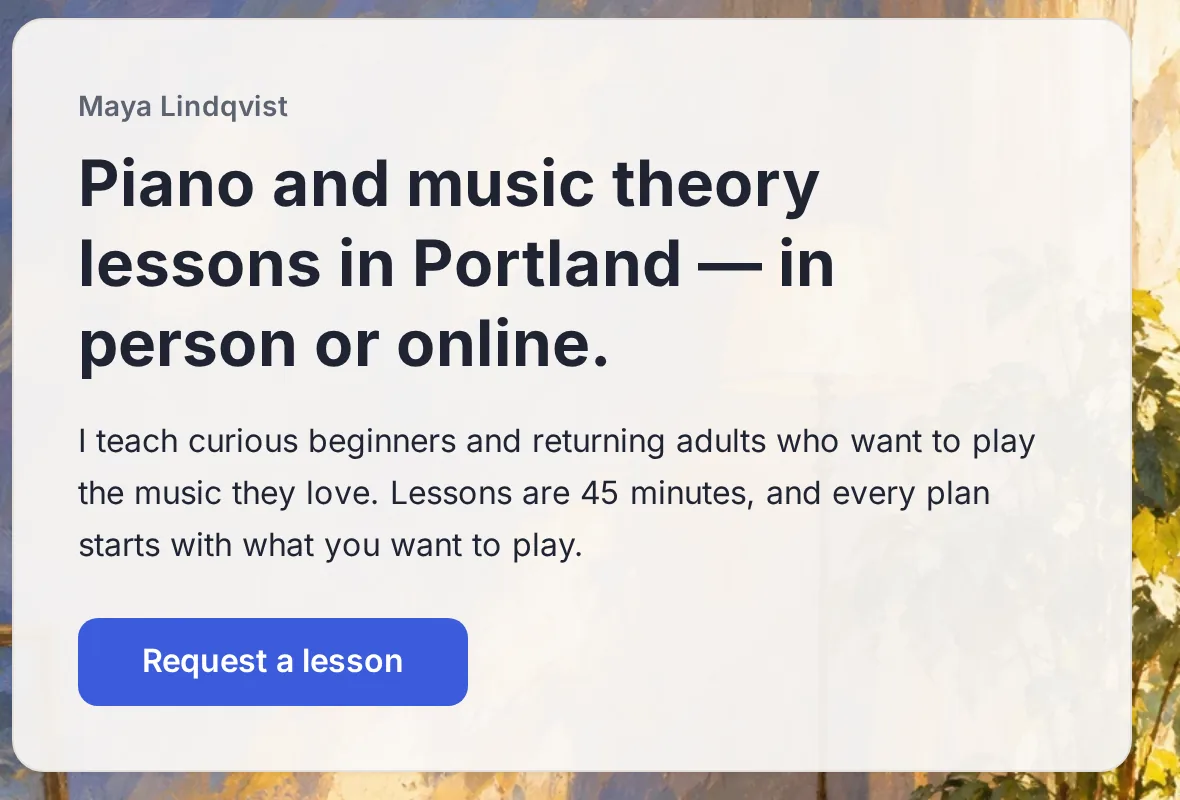
- D-3: the app asked for our brand font but never downloaded it, so most visitors saw a generic substitute font.
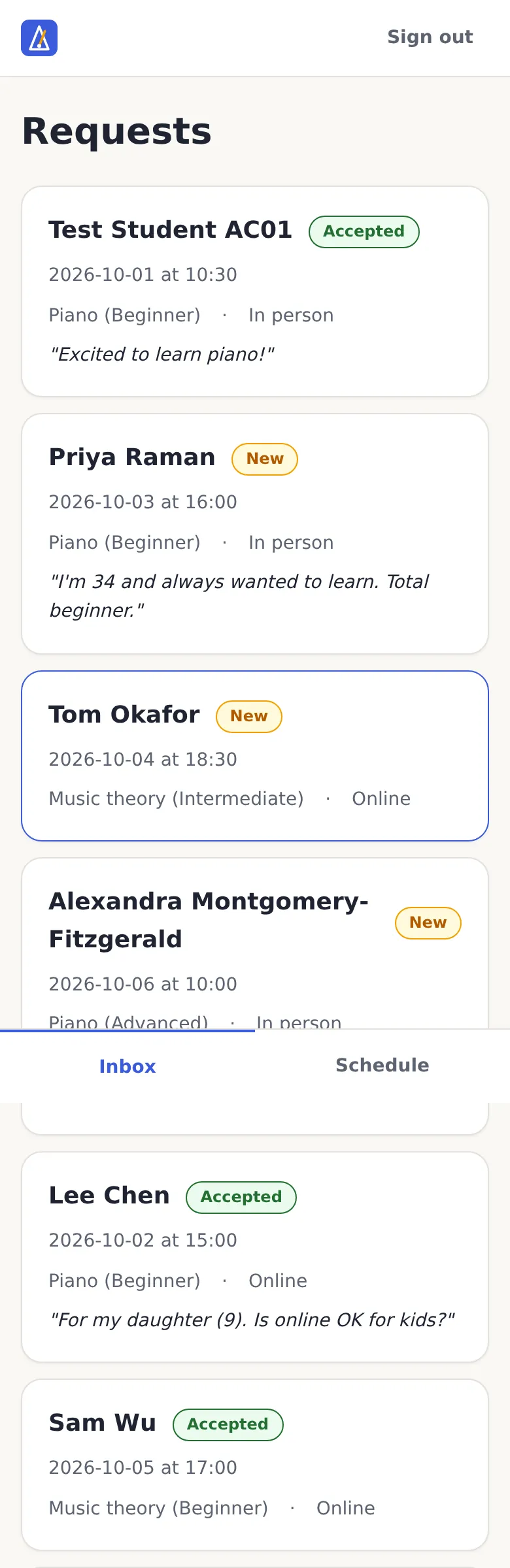
Fix one defect at a time
When something is broken, don’t say “improve this page” — that invites a redesign. Report the defect in a fixed shape: where it happens, the steps to see it, what happens, what should happen (quote your brief), and “fix only this”.
Defect D-[n]
Where: [route] / [desktop or mobile] / [signed in or out]
Steps: 1. … 2. … 3. …
What happens: …
What should happen: [quote the acceptance criterion or copy file]
Fix only this defect and anything it directly depends on. Do not redesign other screens.
After the fix, tell me what changed and how to retest it.
This is the real report that fixed the blank schedule (203 credits):
Defect D-2 (blocks AC-02)
Where: /app/schedule / desktop and mobile / signed in
Steps: 1. Sign in as maya@example.com. 2. On /app, select Schedule in the navigation (or open /app/schedule directly).
What happens: the page renders completely blank. The browser console shows: "React has detected a change in the order of Hooks called by SchedulePage" and "Rendered more hooks than during the previous render", followed by "An error occurred in the <SchedulePage> component". It was already blank in the first build, so AC-02 was reported as passed but does not pass in the browser.
What should happen: AC-02 — "Given a request, when the teacher selects Accept, then it shows in the schedule on the chosen date." The schedule must show Lee Chen and Sam Wu grouped by date, or the approved empty state "No confirmed lessons yet."
Fix only this defect and anything it directly depends on: make SchedulePage call its hooks unconditionally, in the same order on every render. Do not redesign other screens.
Then verify it in a real browser render, not only in unit tests: sign in, open /app/schedule, accept one New request and confirm it appears on its date. Also open every other route in the browser and confirm none of them shows a blank page or a console error.
After the fix, tell me what changed, how to retest it, and why the earlier AC-02 check did not catch it.
Change, compare and approve designs
This is where a prototype earns its keep. Instead of describing a design in a meeting, you ask for it, look at it on a real screen, and decide — in minutes. Every change we made to Tempo followed the same six-step loop:
- Request one change, with what must not change.
- Plan first if it touches layout, imagery or navigation.
- Look at the result in a browser, on desktop and on a phone.
- Compare it with the previous version — same screen, same size.
- Approve it, or ask for a narrow correction, or roll back.
- Record the decision (we used numbered decisions like D-010) so it can’t drift later.
Match the request to the size of the change
Small
Click and adjust
Select one element in the Manus preview and use the quick style controls for colour, type, spacing or borders (docs).
Medium
One batched prompt
Group related changes to one part of the screen, say what must not change, and ask which files were touched.
Large
Plan first
New layouts, imagery or navigation: ask for a plan, review it, then approve the build.
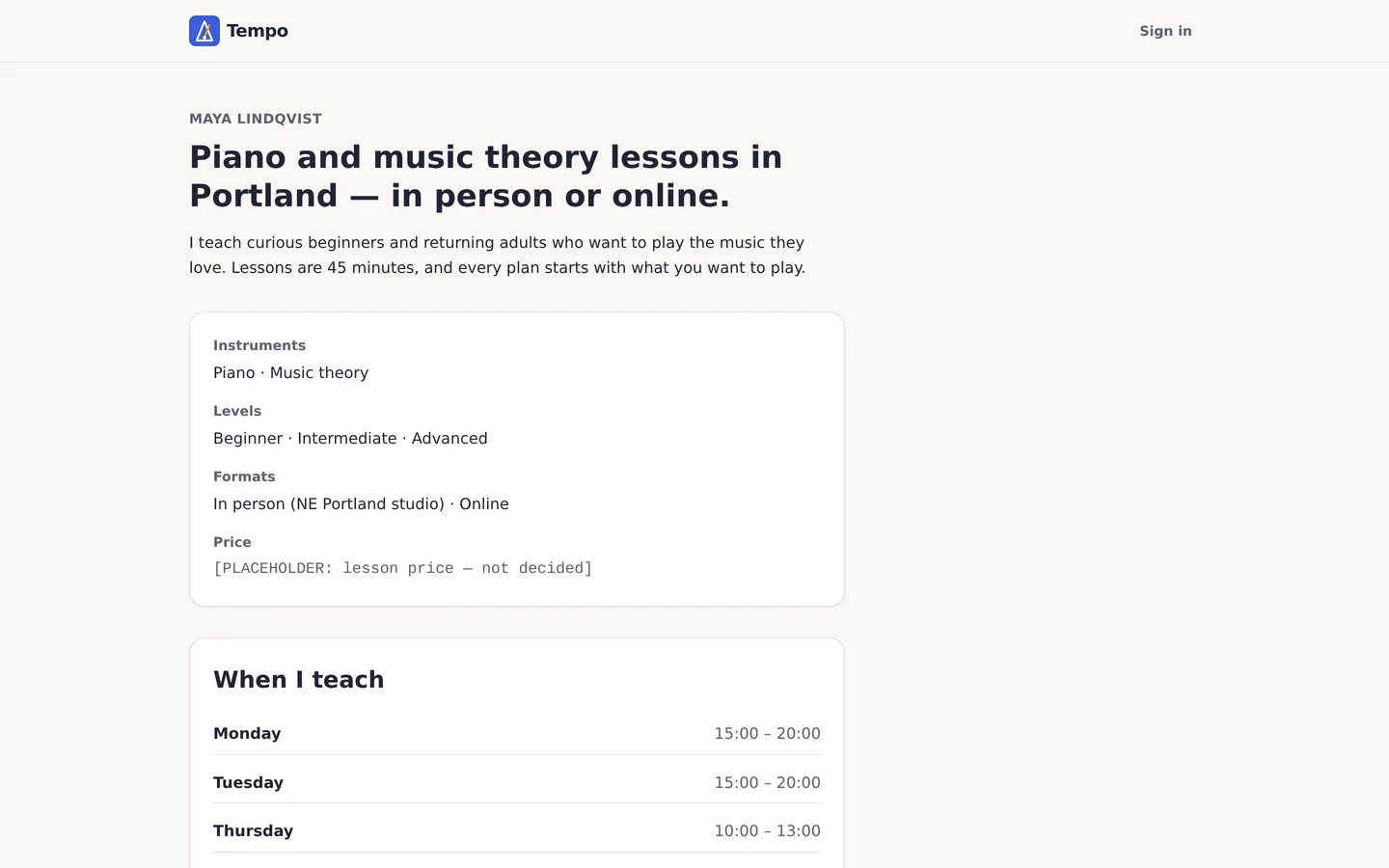
Iteration 1 — giving the prototype a personality (large, planned)
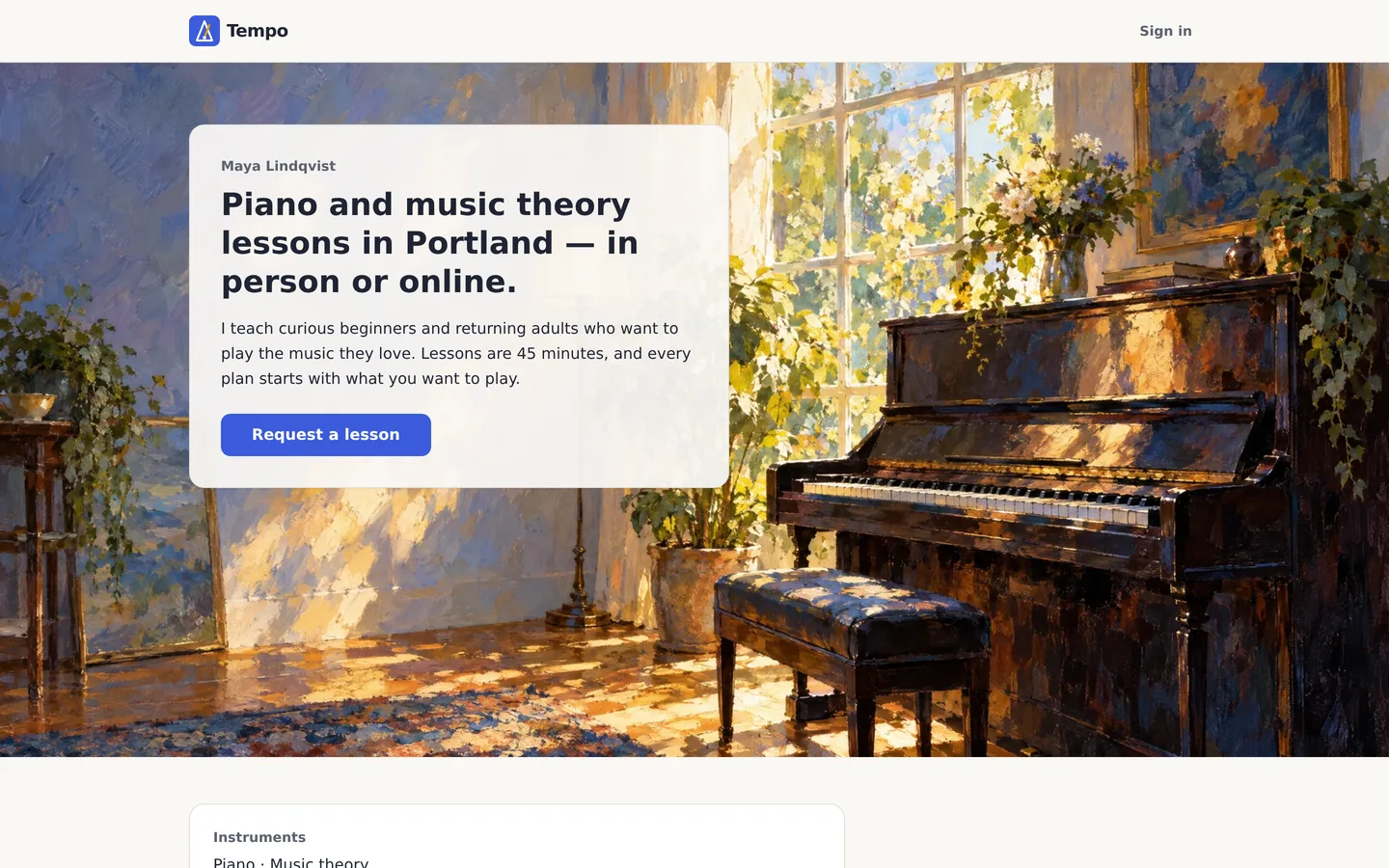
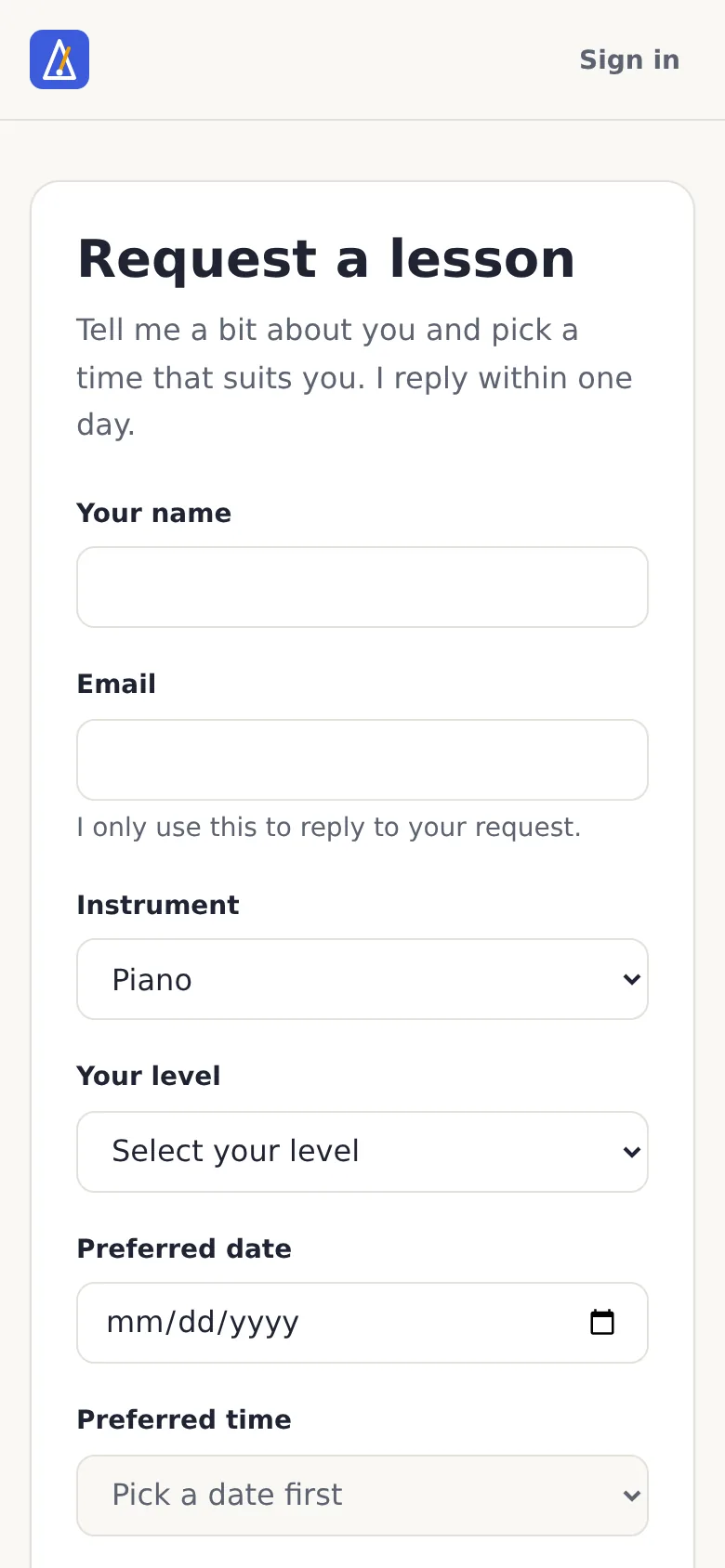
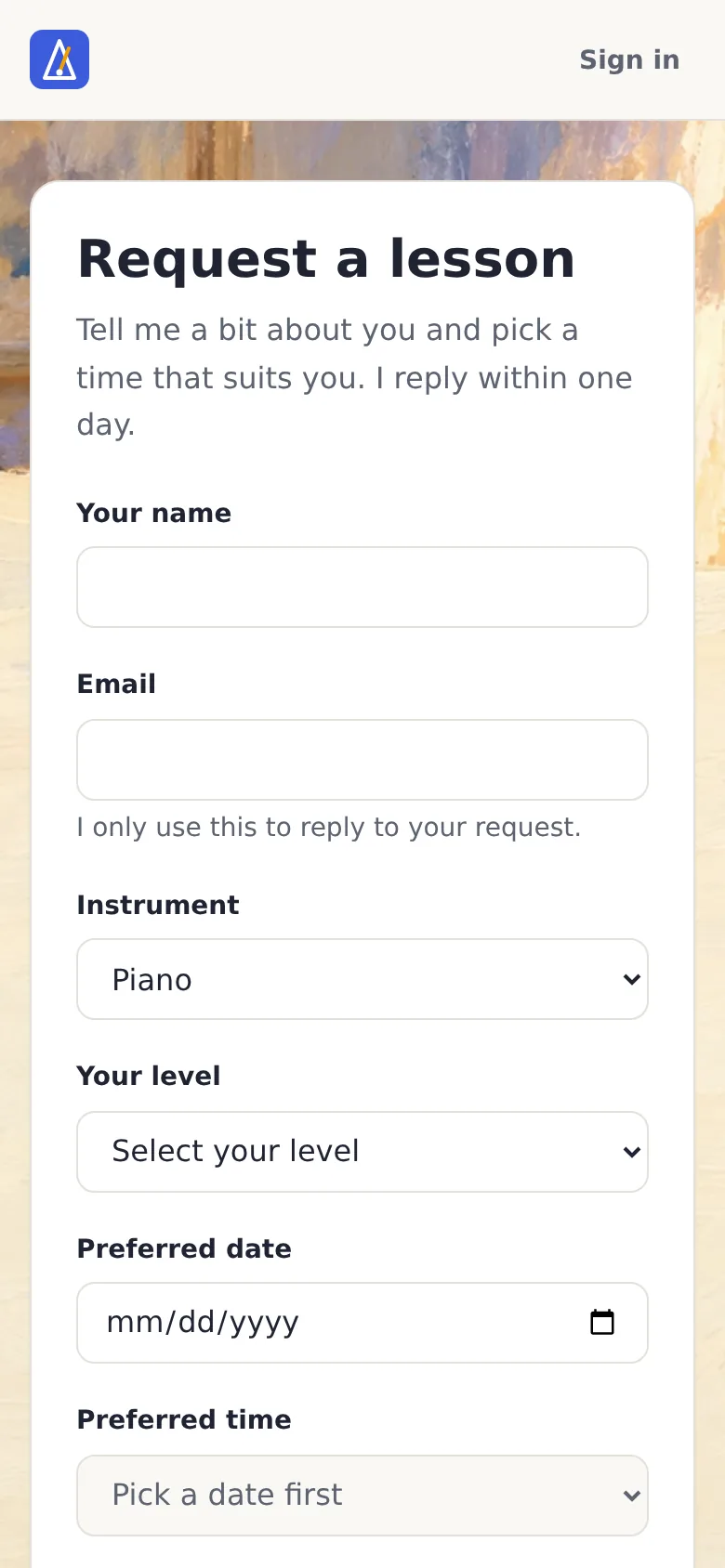
Version 1 was correct and forgettable — it followed our brand sheet exactly, including “no imagery”. We decided Tempo should feel like a music teacher’s studio, with impressionist and Picasso-inspired paintings. Because that overrode an earlier rule, we wrote it down as decision D-010 and asked for a plan first.
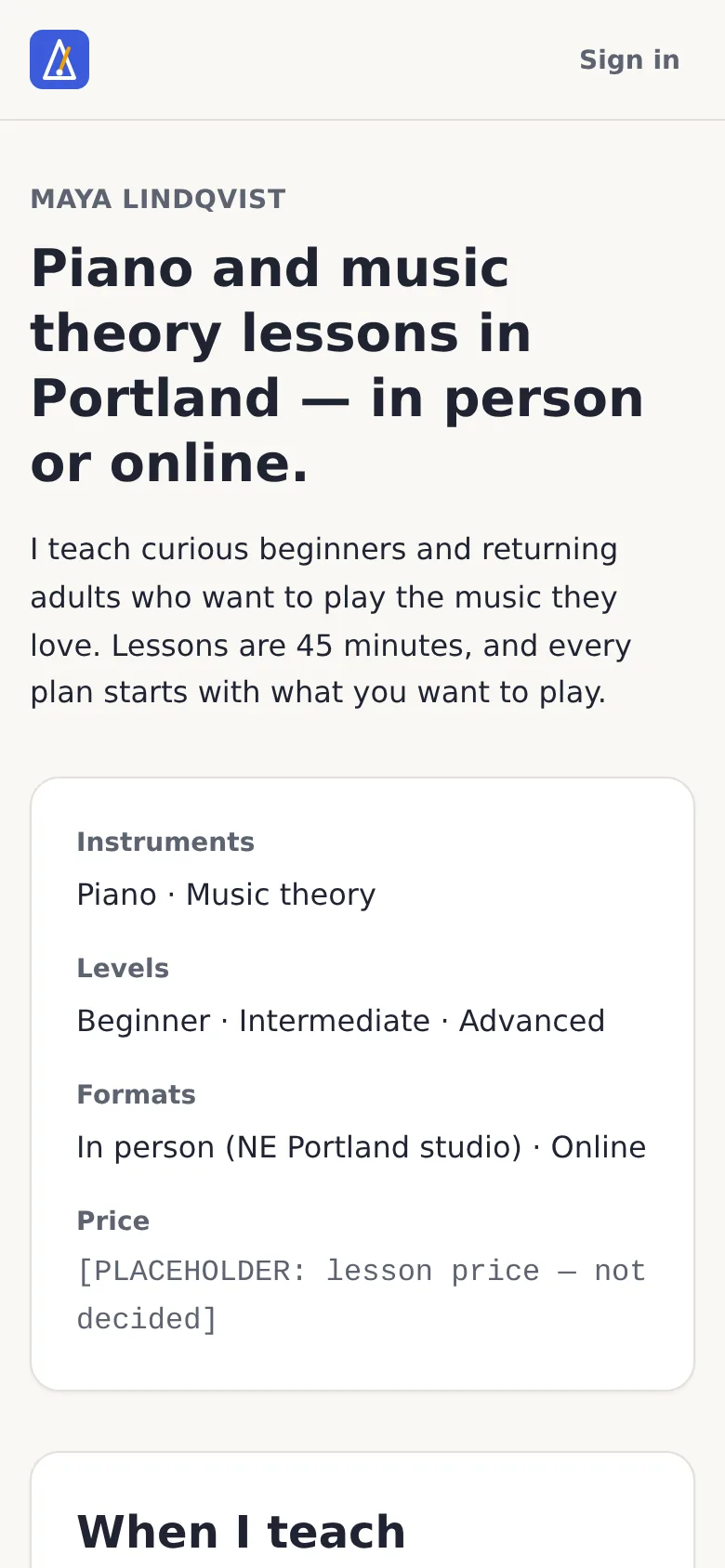
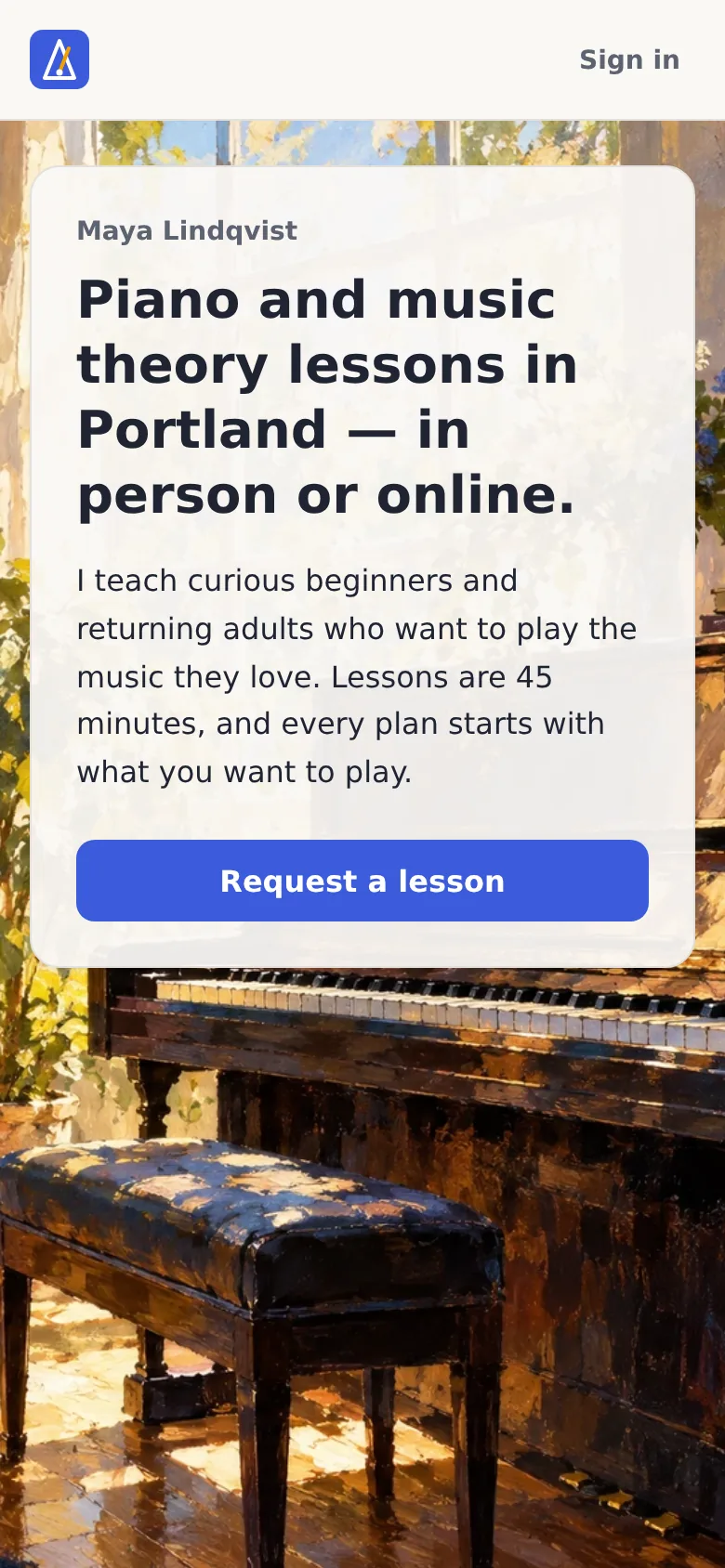
Manus’s plan was careful but too timid: the artwork would have hidden behind text panels. We didn’t approve it as-is. We sent five concrete edits — “make the painting the star: at least 60% of the hero uncovered”, “a bold Picasso-inspired still life beside the availability”, “keep every form fully opaque” — and approved the plan with those changes. That plan-review step cost 87 credits; the build with five original paintings cost 526.
Show the full art-direction prompt we sent
Plan only; do not build yet.

New founder decision D-010 (added to DECISIONS.md, supersedes the "Imagery" and "gradients" lines of 01-brand-tokens.md):
"The public pages get original background artwork in an impressionist / early-cubist (Picasso-inspired) painting style: music-studio scenes, pianos, sheet music, light. UI components keep the brand tokens. A soft overlay ('scrim') behind text is allowed so text stays readable; it is not a decorative gradient."

Target: the public pages /, /request and /request/sent, desktop and mobile. The teacher area (/sign-in, /app/*) gets at most one quiet, low-contrast painterly texture in the header; its working screens stay calm and plain.
Goal: make Tempo feel warm, artistic and memorable, like a music teacher's studio, without hurting readability or speed.

Allowed:
- Generate 3–4 ORIGINAL artworks (no copies of real paintings, no artist signatures, no text or letters in the images, no people's faces):
  1. Hero for /: impressionist (Monet-like broken brushstrokes, soft light) — a sunlit studio corner with an upright piano and a window.
  2. Accent for the availability section: early-cubist / Picasso-inspired still life — guitar-and-sheet-music style fragmented shapes, warm palette that harmonises with #3B5BDB blue and #F59F00 amber.
  3. Calm background for /request and /request/sent: soft impressionist texture (sheet music and light), low detail so the form stays the focus.
  4. Optional: a small painterly texture strip for the teacher header.
- Layout changes on / to give the hero art room (full-bleed hero with the headline and Request a lesson button on a readable card or scrim).
- New image assets, CSS for image layers and scrims.

Preserve: all routes, data, validation, copy (verbatim), brand colour/type/spacing tokens for every UI component, the teacher workflow, and AC-01 to AC-04.

Rules:
- Text must never sit directly on busy artwork: use a card or scrim so every text/background pair still meets WCAG AA.
- Images are decorative: empty alt text, not announced by screen readers.
- Performance: WebP, about 250 KB or less each, sized for mobile and desktop (responsive srcset), hero preloaded, everything else lazy-loaded. No layout shift.
- Mobile at 390 px: art crops gracefully (choose the focal point), no sideways scrolling, the Request a lesson button stays visible without scrolling on the home page.
- Do not add animations, video, carousels, dark mode, or any new features.

Non-goals: no change to the teacher inbox/schedule layouts, no new copy, no new pages.

Before building, show me: a short description of each artwork (subject, style, palette, where it goes, how it crops on mobile), how text stays readable over each, and every page, component and file you will touch. Wait for my approval.
Before
After
Before
After
Before
After
Iteration 2 — restyling one part of the screen (medium, batched)
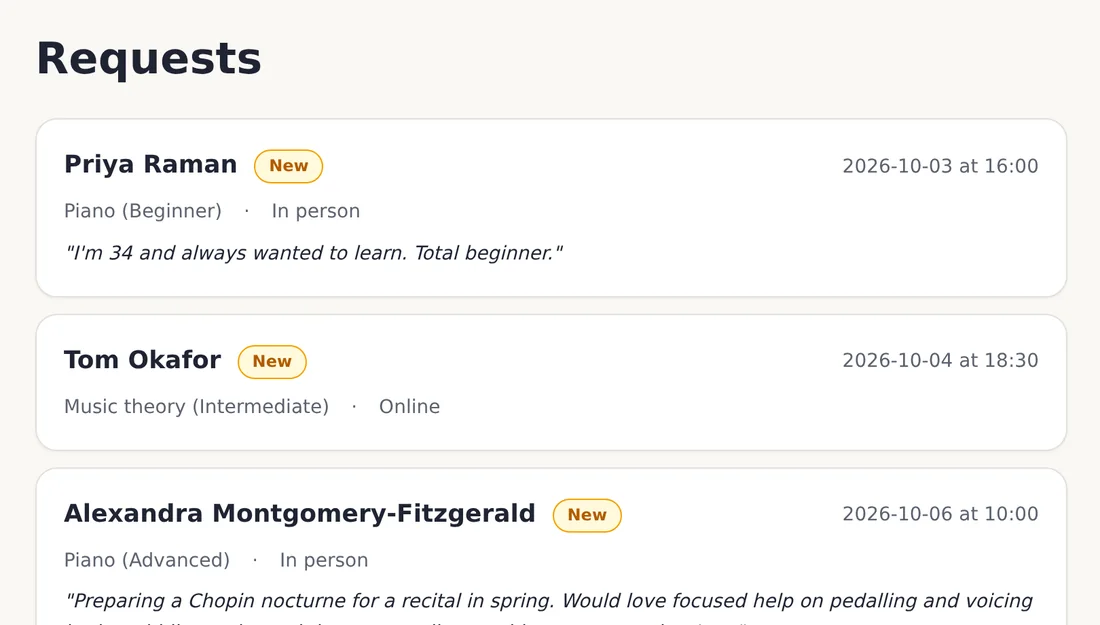
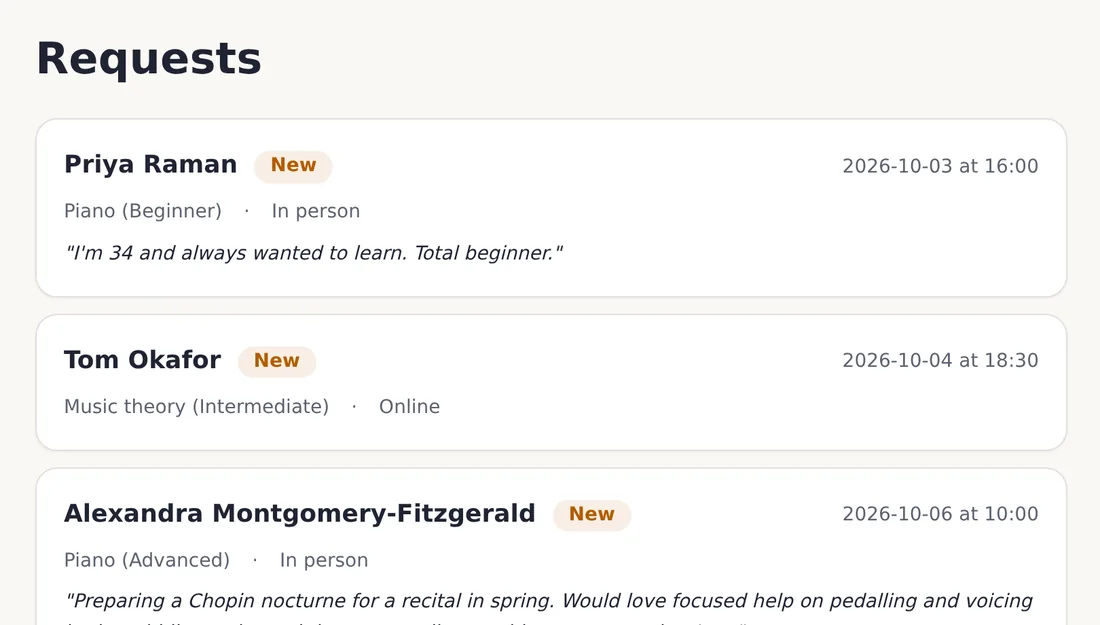
Apply this one batch to the status badges only (New, Accepted, Declined), everywhere they appear:
1. New uses color.feedback.warning text on a 10% tint of the same colour.
2. Accepted uses color.feedback.success the same way.
3. Declined uses color.text.muted the same way.
4. Pill radius (999 px), 12 px horizontal padding, label 14 px / 600.
Do not change layout, copy, routes, data or any other component.
Report every component and route you touched.
Before
After
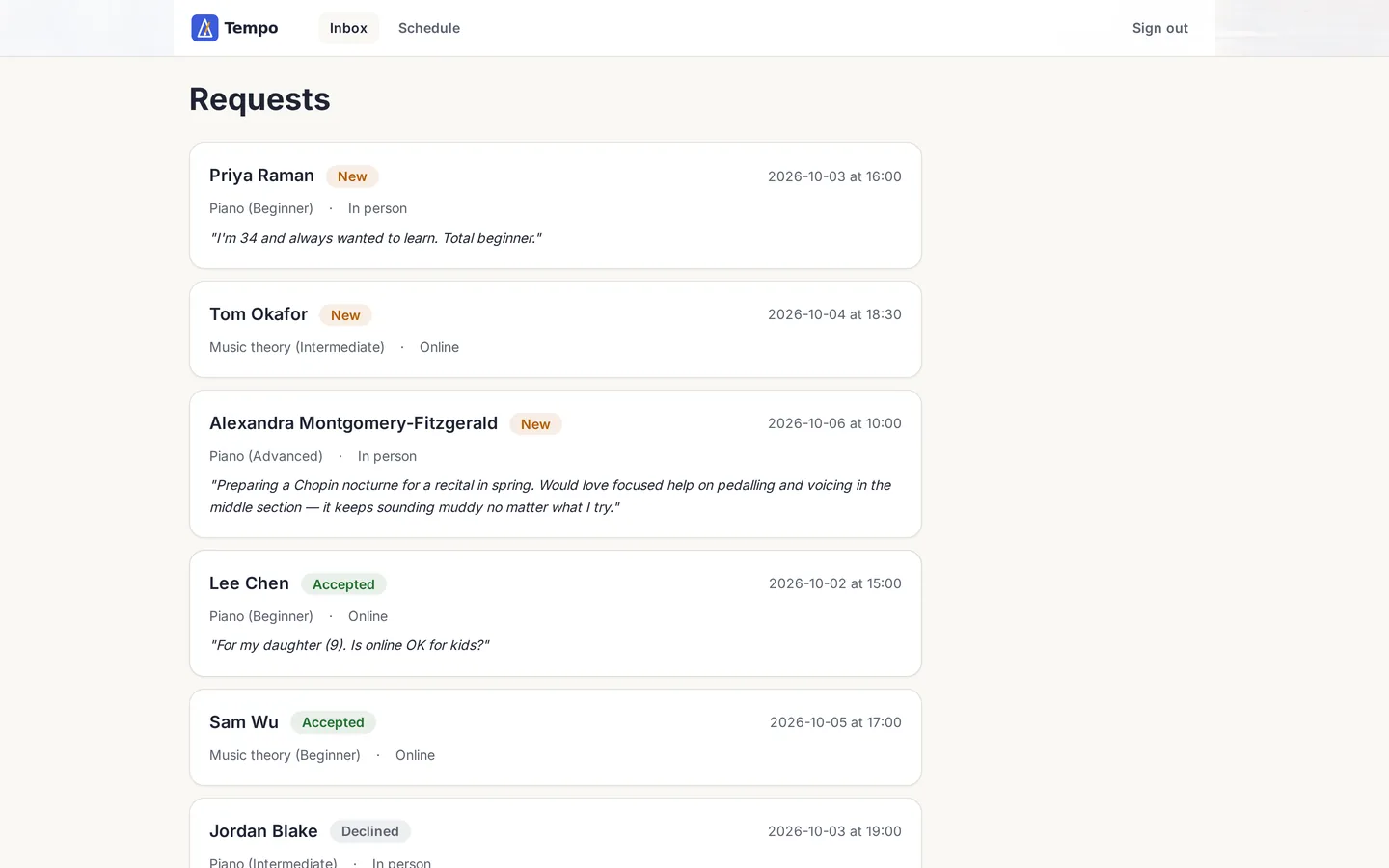
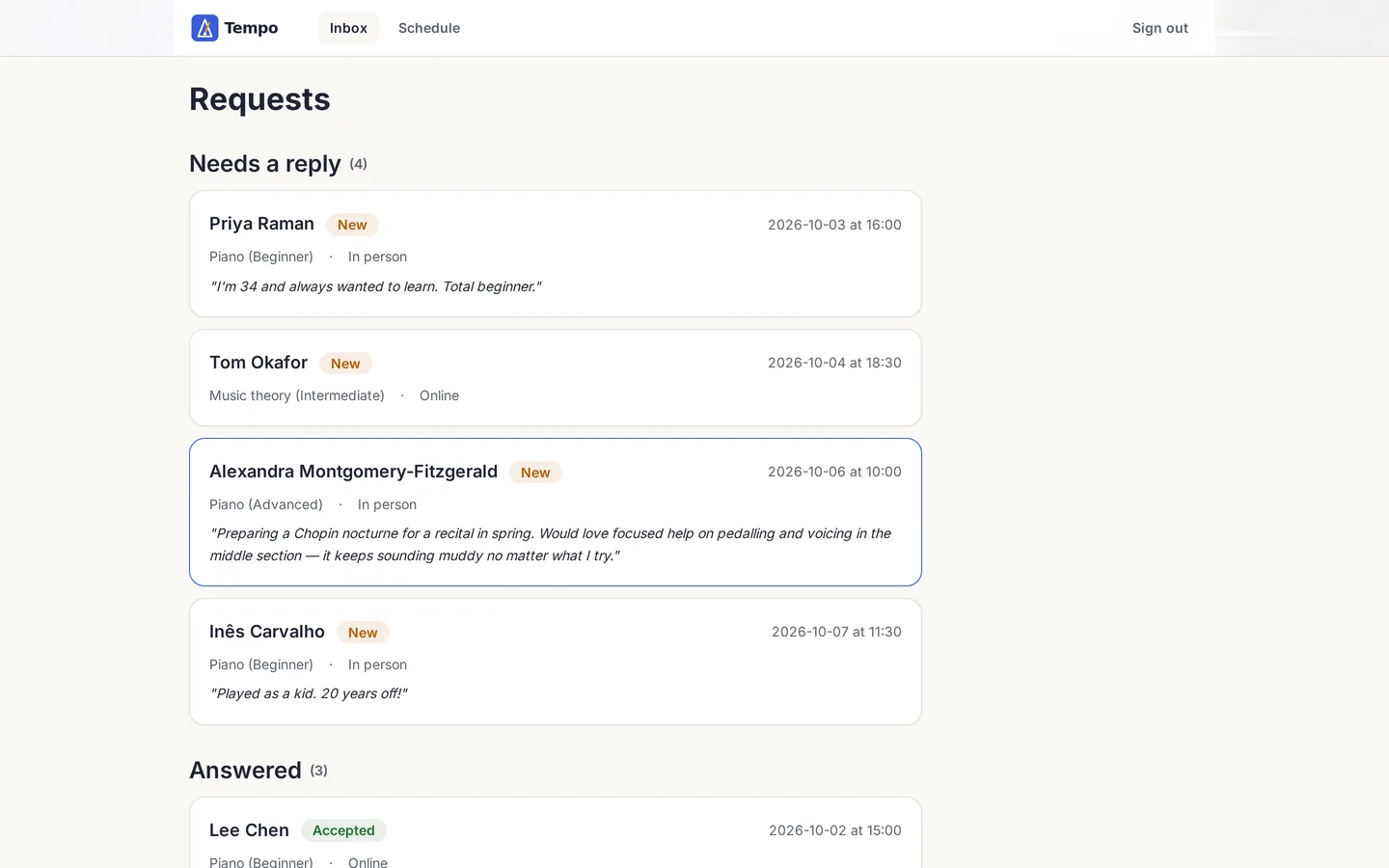
Iteration 3 — reorganising a screen (large, planned)
Plan only; do not build yet.
Target: /app (the request inbox), teacher role, mobile and desktop.
Goal: the teacher can tell at a glance which requests still need an answer.
Allowed: group requests into "Needs a reply" (New) and "Answered" (Accepted, Declined),
and add a count next to each group heading.
Preserve: routes, data, statuses, copy, brand tokens, the schedule page and the public pages.
Non-goals: no filters, search, bulk actions, charts or notifications.
Before building, list every page, component and state you will touch, and how I will test it.
Before
After
Iteration 4 — a detail you only catch by looking
Before
After
How to approve a design (a checklist you can reuse)
- Compare the same screen at the same size — before and after, desktop and phone.
- Check it against your brief and brand sheet, not against your mood that day.
- Use realistic content: long names, empty states, error messages. Our sample data included a 31-character name on purpose.
- Make sure text never sits directly on busy imagery and stays readable in every state.
- Re-check colour contrast after every colour change. Our orange “New” badge passed on white (4.7:1) but fell to 4.1:1 once the batch edit put it on a tinted background — an automated accessibility check caught it, and we darkened the colour.
- Ask the agent which files and screens it touched. Anything unexpected is a reason to look closer.
- Approve explicitly, record the decision, and note the version. If it’s a no, ask for one narrow correction — or roll back.

Publish, connect a domain, keep a copy
When your done-checks pass, publish from the Manus app. Manus saves a version of your app after each change (a checkpoint); publishing puts one of those versions online. A saved version isn’t automatically the live one, so check which one you published (publishing docs).
- Domain: connect your own or buy one in the builder; the secure padlock (SSL) is set up automatically. A custom domain only stays connected while you have an active subscription (custom domains).
- Before big experiments: use Make a Copy — it copies code and database structure but not the data, and starts unpublished (docs).
- Keep the code: download all the code, or copy it to a private GitHub account — GitHub is where developers keep code (code control, GitHub). It is your exit route if you later move to developers.
- Mobile stores: Manus prepares a test version for iPhone and an upload file for Google Play, but the store listing, review and launch are yours (app publishing).
What we did: export the code and host it ourselves
To show you can leave the platform at any time, we asked Manus to package Tempo so we could host it ourselves — all the code, every saved version, the artwork and a copy of the data — and ran it on our own server. It took one prompt (154 credits) and about half an hour of setup. That is the copy you can try at tempo-demo.nerdheadz.com.
Show the export prompt
Please package the complete Tempo project so we can run it on our own server:

1. Create tempo-export.tar.gz from /home/ubuntu/tempo containing ALL source files AND the full .git directory (every commit/checkpoint), but EXCLUDING node_modules, build output (dist/.next/build) and any .env files with secret values.
2. Include a file EXPORT-NOTES.md describing: the exact stack and versions (Node, package manager, framework, database), how to install and run it locally in development and production mode, every environment variable it needs (names only + what each does — no secret values), every Manus-platform-specific dependency (auth, storage, image URLs under /manus-storage, analytics, any SDK) and how to replace each with a self-hosted equivalent, and the database schema/migration + seed commands.
3. Also include a folder art/ with the original full-resolution files of all five D-010 artworks (currently served from /manus-storage/async-images/...), plus a JSON map from each storage URL to its file name.
4. Include a SQL dump of the current database (schema + the 7 seeded requests + availability; the teacher password must stay hashed).
Attach the tar.gz to your reply. Do not publish anything and do not change the app.
The self-hosting package is ready … Complete Tempo source and full .git history (8 commits) … Five full-resolution WebPs … a SQL dump with one hashed teacher account, availability, and exactly 7 seeded requests … No node_modules, build output, or .env files.
In plain words: all the code, every saved version, the five pictures and a copy of the app’s data — with the password stored safely scrambled.
The full credit ledger
Every request we sent, with the credits Manus’s own counter recorded for it.
| Step | What happened | Credits |
|---|---|---|
| Plan only | Read 8 brief files, returned a 9-part plan and 5 open questions | 49 |
| First build | 7 pages, a database, teacher sign-in, sample data and automatic tests | 319 |
| Art-direction plan | Plan for painterly artwork, before any image was made | 87 |
| Art + layout build | 5 original paintings, responsive hero, new layout | 526 |
| Defect D-1 | Removed a leftover test record; made tests clean up after themselves | 93 |
| Defect D-2 | Fixed the blank schedule page (a code error that crashed it) | 203 |
| Batch edit | Restyled the status labels — one building block, nothing else | 45 |
| Defect D-3 | Made the app actually download the brand font it was asking for | 71 |
| Planned change | Inbox grouped into “Needs a reply” and “Answered” — plan, then build | 210 |
| Release prep | Checked the sample data and saved a version ready to publish | 45 |
| Code export | Packaged all the code, its version history, the artwork and the data so we could host it ourselves | 154 |
| Total | Under half of the $20 plan’s monthly credits | 1,802 |
Where Manus shines — and where it needs you
It did well
- Asked real questions instead of guessing.
- Did only what was asked, every time.
- Kept the password out of the code.
- Listed touched files and explained its fixes honestly.
- Produced genuinely good original artwork.
It needed us for
- Every product decision (sign-in, time slots, sign-out).
- Real browser testing — its tests missed a blank page.
- Noticing leftover test data and an unloaded font.
- Pushing the design further than its cautious first plan.
- Clicking approvals only available in the app.
Curious how AI-built code holds up in production? Read our notes on vibe-coding security risks and no-code vs full-code development. If you’d rather not use an AI agent at all, here’s how to build an app without coding.
When to bring in developers
A Manus app is a superb way to validate an idea. Bring in engineers when mistakes get expensive:
- Money: payments, subscriptions, refunds, invoices.
- Sensitive data: health, finance, children, identity documents.
- Complex permissions: teams, organisations, many roles.
- Connecting to your other tools: your CRM, accounting software or older company systems.
- Scale and reliability: real traffic, uptime promises, performance.
- The app is now the business: it needs code review, monitoring and maintenance.
That’s the moment to export the code and get a proper review — or to rebuild the parts that matter. See how teams handle moving from a builder to custom code.
NerdHeadz turns validated prototypes into production software.
We’re an AI-powered custom software agency. Send us your Manus app or your brief — we’ll tell you what to keep, what to harden and what it would take.
Frequently asked questions
Can AI really build a working app for a non-technical founder?
Yes, for a focused first version. In our test, Manus built a seven-screen web app with a database, a password-protected teacher area, form error messages and automatic tests from a one-page brief. It still needed a human to answer its questions, review the plan, test it in a browser and report three defects it had missed.
How much does it cost to build an app with Manus?
Our complete build used 1,802 Manus credits — under half of the 4,000 monthly credits in the $20 Pro plan, so roughly $9 worth. Add about $10–15 a year if you want your own domain. A web app comfortably fits under $200; publishing native iOS and Android apps adds Apple's $99 yearly fee and Google's $25 one-time fee.
Is Manus free? How do credits work?
Manus has a free tier with 300 daily credits, but putting a website online is a Pro feature (from $20 a month for 4,000 credits). Credits are spent on the agent’s work — reasoning, running code, generating images. Manus says keeping your app online does not use credits; hosting is billed separately, and the plan includes a monthly allowance that covers a small app.
How long does it take to build an app with Manus?
In our test the agent worked for about 75 minutes across ten requests. Your own hands-on time is mostly writing the brief, reviewing the plan and testing — realistically 3 to 5 hours for a small app like ours. Complex apps with payments, many roles or integrations take longer.
Do I need to know how to code to use Manus?
No. Every instruction in our build was plain English. What you do need is product clarity: who the users are, what each can do, what data the app stores, and what “working” means. The guide includes a free starter pack with every file we used.
Can Manus publish my app to the App Store and Google Play?
Manus can prepare the builds — a test version for iPhone (through Apple’s TestFlight) and an upload file for Google Play — but it is not a one-click store launch. You need your own Apple Developer ($99/year) and Google Play ($25 one-time) accounts, and new personal Google Play accounts must run a closed test with at least 12 testers for 14 days.
Do I own the code Manus writes?
You can download all of the code, or copy it to a private GitHub account (GitHub is where developers keep code), which is what makes a later hand-off to developers possible. Read Manus’s terms for the legal detail, and keep your own copy of the code and your brief.
When should I hire developers instead of using an AI app builder?
When mistakes get expensive: taking payments, storing health, financial or children’s data, complex permissions, integrations with your other systems, heavy traffic, or when the app has become the business and needs long-term maintenance. AI builders are excellent for validating an idea; production systems need engineering review.
Sources
Manus documentation and pricing were checked on 1 October 2026; products change, so re-check before relying on a detail.
- Manus — membership pricing
- Manus — usage and pricing
- Manus — Projects
- Manus — Plan Mode
- Manus — editing and previewing
- Manus — publishing
- Manus — custom domains
- Manus — Make a Copy
- Manus — code control and GitHub integration
- Manus — app publishing
- Apple Developer Program enrollment
- Google Play developer registration fee and testing requirements
Related: prototyping AI products · steps before launching a no-code MVP · finding your first users · prototyping services · UX/UI design · MVP development