In this article08 +
- Google's Gemini 4 lineup in one minute
- Pricing, and the catch in the token bill
- What the benchmarks say
- Hands-on: where Neon shines and where it slips
- Which Gemini 4 model to pick
- Free and open-weight models that compete
- Free ways to try these models today
- How to choose: a routing setup that uses all of them
*Last updated: November 22, 2026*
Google has shipped four Gemini 4 models in about five weeks, and the names don't tell you which one to use. Argon arrived first, then Carbon, then Hydrogen, and on November 18 Gemini 4 Neon. They are named after elements, not sizes, and the newest one sits in the middle of the range rather than at the top.
This guide answers two questions. Which Gemini 4 model should you use for what? And when should you skip Google entirely for a free or open-weight model you can run yourself? We pulled together Google's own model and pricing documentation, independent measurements from Artificial Analysis, a hands-on test from DataCamp, comparison write-ups from Fello AI and AIHubMix, the Hacker News launch thread, and the model cards of the leading open-weight models. Where a number comes from the vendor and not an independent tester, we say so. Neon is four days old, so treat every figure as provisional.
Google's Gemini 4 lineup in one minute

Here is the lineup in release order, with Google's positioning:
- Gemini 4 Argon (
gemini-4-argon) went generally available on October 13. Google calls it its efficient frontier reasoning model. It is now the odd one out: Hydrogen matches it on independent tests, and several sources report it has dropped out of the Gemini app's model picker. - Gemini 4 Carbon (
gemini-4-carbon) entered preview on October 28 and went generally available on November 10. It is Google's strongest reasoning model, aimed at deep work in coding, finance, legal, cybersecurity and science. - Gemini 4 Hydrogen (
gemini-4-hydrogen) went generally available on November 12. It is the everyday default, and Google's own advice is to start with Hydrogen and move up only when a task gets harder. - Gemini 4 Neon (
gemini-4-neon) launched on November 18. Google describes it as frontier-level intelligence with fast end-to-end task completion, sitting between Hydrogen and Carbon for high-frequency complex tasks. The model card, as quoted by DataCamp and Wikipedia, says Neon was adapted from Gemini 4 Carbon.
All four share the same basic shape: a context window of about one million tokens (1,048,576 exactly), text, image, video, audio and PDF input, and text output. They differ in thinking levels. Hydrogen and Neon offer low, medium, high and a new xhigh setting, and both default to high in the API. Carbon offers low, medium and high, and defaults to medium.
Neon also supports function calling, structured outputs, code execution, computer use, Google Search grounding and batch processing. It does not support explicit context caching, only Google's automatic implicit caching. That matters if your app reuses long prompts.
Pricing, and the catch in the token bill

Per-token prices from Google's API pricing page, per million tokens:
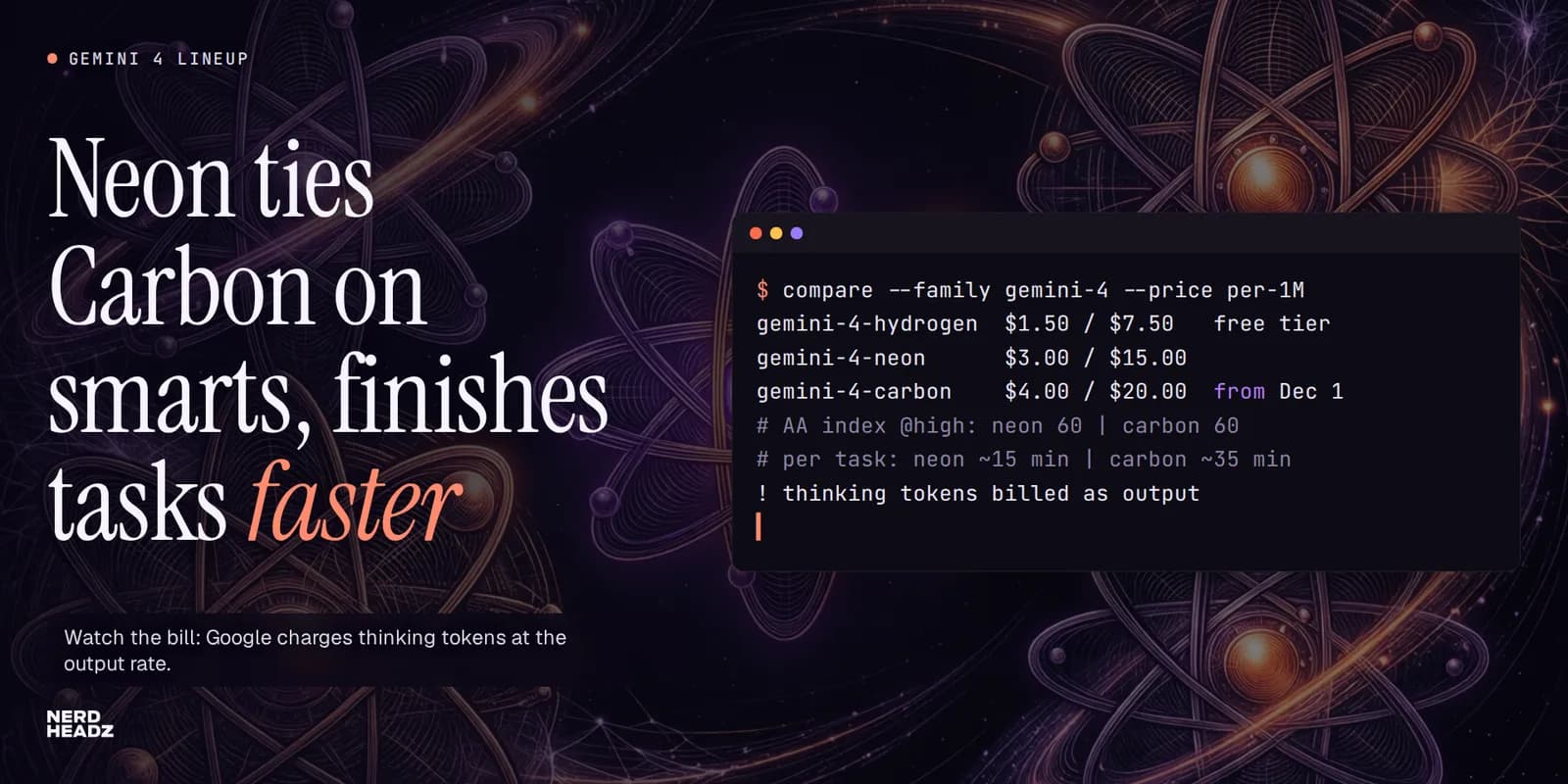
- Hydrogen: $1.50 input, $7.50 output, $0.075 cached input. It is the only Gemini 4 model with a free API tier, and Google notes that free-tier data is used to improve its products.
- Neon: $3.00 input, $15.00 output, $0.15 cached input, flat across the full one-million-token window. No free tier.
- Carbon: $2.00 input and $10.00 output through November 30, rising to $4.00 and $20.00 from December 1. Argon follows the same schedule.
- Batch and Flex processing halves the price on every model. Priority processing costs 1.8 times the standard rate.
So for the next week Neon costs more per token than Carbon. From December it costs 25% less. If you are benchmarking the two right now, rerun your cost maths after the 1st.
Per-token price is not what you actually pay, though. Here is the catch. Google bills thinking tokens as output tokens. Every step up in thinking level means more hidden reasoning, billed at the output rate. Artificial Analysis describes Neon at xhigh as "notably slow per task and very verbose." To run its full Intelligence Index, Neon at xhigh produced about 283 million output tokens, against a median of about 65 million for the models it compares against. At high, the default, it used 123 million.
Two more details catch teams out when they migrate:
- `max_output_tokens` caps thinking and the visible answer together. The default ceiling is 65,536 tokens. If the model spends most of that budget thinking, the answer gets cut off. Google advises setting it to at least 65,536 when you run evaluations.
- Remove `temperature`, `top_p` and `top_k` from your requests when you move to Neon. Google's documentation says out-of-range values return a 400 error, which is an unpleasant surprise in a production rollout.
The practical lesson: pick the thinking level per task, not per app. Low and medium are much cheaper, and for many routine jobs the quality difference is small.
What the benchmarks say
Independent numbers first. Artificial Analysis scores each model at every thinking level on its Intelligence Index (version 5):
- Neon: 44 at low, 55 at medium, 60 at high, 61 at xhigh.
- Carbon: 54 at low, 58 at medium, 60 at high.
- Hydrogen: 27 at low, 41 at medium, 51 at high, 54 at xhigh.
- Argon: 48 at medium, 50 at high.
Three things stand out. Neon at high ties Carbon at high. Neon falls off much faster than Carbon at low effort, so it is not a cheap model when you turn the dial down. And Hydrogen at high matches Argon, which explains why Argon is fading from the lineup.
Speed is where Neon earns its place. Artificial Analysis measured Neon at about 15 minutes per index task at high and about 100 output tokens per second. Carbon at high took about 35 minutes per task at about 59 tokens per second. Hydrogen is the fastest of the three at about 156 tokens per second and 9 minutes per task. Measured cost per task: $6.44 for Neon at xhigh, $3.16 for Hydrogen at xhigh, and $7.76 for Carbon at high at the December price.
One caution for factual work. In AIHubMix's November 19 snapshot of Artificial Analysis data, Neon had the lowest non-hallucination rate of the four Gemini 4 models at high effort (86.1%, against 88.6% for Carbon, 91.3% for Hydrogen and 95.7% for Argon). Put another way, Neon makes things up a little more often than its siblings when it doesn't know an answer. If your app answers factual questions, ground it with retrieval or search.
Now Google's numbers. DataCamp compiled Google's published table, all vendor-reported, comparing Neon with Claude Opus 5.5 and GPT-6.2 Sol:
- GraphWalks (long-context reasoning over 256K to 1M tokens): Neon 95.2%, Opus 5.5 66.8%, GPT-6.2 Sol 80.1%.
- AutomationBench: Neon 56.3%, Opus 5.5 42.5%, Sol 41.3%.
- Terminal-bench 4.1: Neon 65.2%, Opus 5.5 65.8%, Sol 61.5%.
- FrontierCode 2.0 (merge-ready changes to real codebases): Neon 46.2%, Opus 5.5 47.3%, Sol 43.8%.
Our reading: Neon's clearest lead is long-context work, where reading and reasoning across hundreds of thousands of tokens is the point. On coding it is roughly level with the best, not ahead. DataCamp's headline says Neon wins 17 of 19 benchmarks, but by its own table the count is 16, and both losses are in coding. For context on the OpenAI side, see our GPT-6.2 Astra and Sol review.
Hands-on: where Neon shines and where it slips

The early hands-on evidence agrees on one pattern: Neon is a strong collaborator when someone is steering, and less dependable when left alone on long, detail-heavy jobs.
The good: it finishes. DataCamp built the same chess game three times with Neon and three times with Carbon, both at medium thinking. Neon produced a working page all three times, at $0.83 to $1.06 per run. Carbon worked only once. In the other two runs it spent about 40,000 tokens thinking, then tried to write roughly 26,000 tokens of code in one response and ran into the output cap. Neon thought for 13,000 to 17,000 tokens and then got on with it. Three runs is a small sample, but it matches Google's claim that Neon finishes faster with fewer output tokens than Carbon.
The mixed: quality on hard work. On the Hacker News launch thread, one developer who ran Neon through their own test suite found it about four times faster and half the cost per task compared with Carbon, but "far below Carbon in terms of quality." Others said Gemini models still don't feel as good as Opus 5.5 for agentic work despite the benchmarks. Several commenters praised Gemini 4's writing, with one calling it clearly better at English prose than any Anthropic model.
The complaints: churn and naming. The most common complaint in the thread wasn't about quality at all. Four models in five weeks, element names, four thinking levels each and a Carbon price that doubles on December 1 left many developers unsure what they would be paying for next month. Some also reported tighter usage quotas in Google's consumer plans. If your team needs stable costs, pin model versions and budget with the December prices.
Our reading: use Neon interactively, or in agents with short, checkable steps. For long unattended runs where one missed detail breaks the result, Carbon, or a model from another vendor, is still the safer bet, and you should check the output either way.
Which Gemini 4 model to pick

A simple decision guide, based on the evidence above:
- Pick Hydrogen for high-volume everyday work: summarising, classifying, extracting, drafting, routine coding help and customer-facing chat. It is the cheapest, the fastest and the only one with a free API tier. Start here, as Google itself recommends.
- Pick Neon for complex work where speed matters and a person or a test suite checks the output: interactive coding, analysis of very long documents, slide and report drafts, and agent steps that are short and verifiable. Run it at medium or high, not xhigh, unless a task truly needs it.
- Pick Carbon for the hardest, slowest jobs where depth beats speed: complex research, multi-file refactors, legal or financial analysis. Budget for the December price and give it a generous output-token limit so it doesn't stop mid-answer.
- Skip Argon for new projects. Hydrogen matches it on independent tests at a lower price.
In the Gemini app, access follows the plans, according to Google's help pages as compiled by Fello AI: free users get Hydrogen for tasks, AI Plus ($4.99 a month) gets Hydrogen, AI Pro ($19.99 a month) adds Neon, and AI Ultra adds Carbon. In the API, Neon and Carbon are paid-tier only.
Free and open-weight models that compete

This is where the market has changed most in 2026. Several open-weight models are now close enough to the closed frontier that running your own model is a real architectural option, not a hobby. "Free" here means the weights are free to download. Running them still costs hardware, power and engineering time. Always read the licence: several open models restrict large commercial hosting.
Models you can run on one good GPU or a laptop:
- Qwen3.8-27B (Alibaba): the first model to try in November 2026 if you have a 24 GB graphics card. It is a dense 27-billion-parameter model under the permissive Apache 2.0 licence, with a 262,144-token context window (extendable to one million). A 4-bit version is about 17 GB. Qwen reports 61.7 on SWE-bench Pro and 90.3 on LiveCodeBench v6. Both are vendor numbers, but strong ones for its size.
- Gemma 4 (Google): Google's own open family, released under Apache 2.0 in April 2026. It comes in five sizes: E2B and E4B for phones and laptops, a 12B, a 26B mixture-of-experts model with about 4B active parameters, and a 31B dense model that is about 20 GB in Ollama. Google reports 84.3% on GPQA Diamond for the 31B. If you want Google quality without Google's API, start here.
- gpt-oss-20b and gpt-oss-120b (OpenAI): OpenAI's Apache 2.0 open models. The 20B runs on a 16 GB machine. The 120B is a mixture-of-experts model with about 5 billion active parameters and a 128K context window. Neither is close to the 2026 frontier anymore, but both are stable, well-supported workhorses for private deployments.
- Mistral Small 4 and the Ministral 3 family (Mistral): Apache 2.0. Small 4 is a 119-billion-parameter mixture-of-experts model with only 6 billion active, so it runs fast once loaded. Ministral 3 comes in 3B, 8B and 14B sizes for edge devices, and Devstral Small 2 (24B) is the coding-focused option.
Frontier-class open models that need a server:
- Kimi K3.1 Pro (Moonshot AI): the strongest open-weight model right now. Weights went public on November 2: 2.8 trillion parameters with 104 billion active, a one-million-token context, and a 1.56 TB download that needs a multi-GPU server such as eight Nvidia B300s. Moonshot reports 65.7 on Terminal-Bench 4.0 against 66.4 for Claude Opus 5.5 in the same table. The custom licence requires a separate agreement for large model-as-a-service businesses. Moonshot's hosted API costs $2 input and $10 output per million tokens, which is cheaper than Neon.
- DeepSeek V4.1 Flash (DeepSeek): MIT licence, a one-million-token context, and some of the cheapest hosted prices on the market, around $0.15 per million input tokens through aggregators. It is a large mixture-of-experts model, so self-hosting means a GPU server, but most teams use it through cheap hosted endpoints. We covered what you can build with it in DeepSeek open source: what you can actually build.
- Tencent Hy4 flash (Tencent): released as open weights on November 17. It has 220 billion total parameters with about 12 billion active per token and a one-million-token context. Community quantisations fit on a 128 GB unified-memory Mac. It uses a custom Tencent licence with thresholds for large hosted services.
- Nemotron 3 Ultra (Nvidia): 550 billion parameters with 55 billion active, under the OpenMDW licence, which allows commercial use. It needs at least eight high-end Nvidia GPUs to self-host, but it is also the most-used free model on OpenRouter (more on that below). Nvidia reports 70.7 on SWE-bench Verified.
- Mistral Large 4 (Mistral): Mistral's one-trillion-parameter multimodal flagship, with open weights since October 29 under a modified MIT licence that needs a commercial agreement for model-as-a-service businesses.
- Muse Spark Open (Meta): Meta's newest open-weight release, with weights published on October 15: 816 billion parameters with 42 billion active, multimodal input and a custom Muse licence. The older Llama 4 family has no open successor under the Llama name.
How close are they really? On Plotly's data analytics exam, covered in our GPT-6.2 review, Kimi K3.1 Pro scored 42 of 43, ahead of both GPT-6.2 Astra and Sol, but it was much slower, and a hosted run cost about eleven times more than Sol. That trade-off sums up open models in late 2026: the quality is there at the top end, and the savings show up with high volume, self-hosting, private data or fine-tuning, not on a single request.
Free ways to try these models today

You don't need a GPU to test most of this. The genuinely free routes:
- Gemini API free tier for Hydrogen. Google's pricing page lists a free tier for Gemini 4 Hydrogen, with the caveat that free-tier data is used to improve Google's products. Fine for prototypes, not for customer data.
- Google Search grounding: 5,000 free grounded queries a month across Gemini 3 and later models, then $14 per 1,000.
- OpenRouter free models. OpenRouter lists a rotating set of
:freemodel variants. The most-used right now are Nvidia's Nemotron 3 Ultra, Nemotron 3.5 Super VL and Nemotron 3.5 Lightning. There is also anopenrouter/freerouter that picks a free model for you. Expect strict rate limits: one independent test on November 3 found only 6 of 14 free model IDs answered reliably, and three returned rate-limit errors every time. Free variants are for experiments, not production. - Run it locally with Ollama or LM Studio. Both are free. Qwen3.8-27B, Gemma 4 and gpt-oss download in one command, and nothing leaves your machine. For sensitive data that is the strongest privacy option there is.
- The Gemini app's free plan includes Hydrogen for tasks, if you just want to see how the everyday model feels before writing code.
How to choose: a routing setup that uses all of them

The real lesson of five weeks of Gemini 4 launches is not which model wins. It's that the lineup, the prices and the leaderboard now change monthly. Teams that bet their product on one model keep rewriting code. Teams that route between models simply update a config file.
A setup we would recommend for most products:
- Default tier: Gemini 4 Hydrogen, GPT-6.2 Sol, or a self-hosted Qwen3.8-27B or Gemma 4 for routine, high-volume requests. Pick on cost per correct answer for your own tasks, not on launch charts.
- Escalation tier: Gemini 4 Neon for complex but checkable work, especially anything involving very long documents. Claude Opus 5.5 or Carbon for long unattended agent runs where reliability matters more than speed.
- Private tier: an open-weight model on your own infrastructure for regulated or sensitive data. Qwen and Gemma cover most cases on one GPU; Kimi K3.1 Pro or DeepSeek if you need frontier quality and have the hardware.
- Guardrails everywhere: set thinking levels per task, set an explicit
max_output_tokens, log token usage by model, and keep a small set of your real tasks as a regression test you rerun whenever a model changes.
Most agent frameworks and gateways (LangGraph, the OpenAI Agents SDK, LiteLLM, Vercel's AI SDK, OpenRouter) already let you swap providers with a model ID. Build that in from the first day and the next element Google names becomes a one-line change, not a project.
“The model lineup now changes every month. Build so the next launch is a config change, not a rewrite.”
Google's Gemini 4 lineup is easier to use than its names suggest. Hydrogen is the cheap, fast default and the only one with a free API tier. Neon is the fast midweight that ties Carbon on independent tests at high effort and leads on long-context work, but it is verbose and works best with someone checking its output. Carbon is the slow, deep option, and its price doubles on December 1. Argon can be skipped. Meanwhile, open-weight models such as Qwen3.8-27B, Gemma 4, Kimi K3.1 Pro and DeepSeek V4.1 Flash are now good enough that running your own model is a real choice, not a compromise.\n\nDon't pick one winner. Route each task to the cheapest model that does it well, set thinking levels and output limits on purpose, and keep a small test set of your own work to rerun every time a new model ships.\n\nChoosing models for your product or AI agents? Talk to our team about model routing, evaluation, self-hosting and cost control. See also our AI agent development services and our breakdown of what an AI agent costs to build.
FAQ
Frequently asked questions
What is the difference between Gemini 4 Neon, Hydrogen and Carbon?
Hydrogen is Google's everyday default: the cheapest and fastest Gemini 4 model at $1.50 input and $7.50 output per million tokens, with a free API tier. Neon is the midweight released on November 18, 2026, at $3 and $15, built for complex tasks that need speed; it ties Carbon at high effort on Artificial Analysis's index and finishes tasks more than twice as fast. Carbon is Google's strongest reasoning model for the hardest, slowest work, at $2 and $10 until November 30 and $4 and $20 from December 1.
Is Gemini 4 Neon free?
No. In the Gemini API, Neon is paid-tier only. In the Gemini app it is included from the AI Pro plan ($19.99 a month). The free options in the Gemini 4 family are Hydrogen, which has a free API tier and is available for tasks on the Gemini app's free plan, and Google's open-weight Gemma 4 models, which you can download and run yourself under the Apache 2.0 licence.
Why is my Gemini 4 Neon bill higher than expected?
Google bills thinking tokens at the output rate, and Neon thinks a lot at higher effort levels. Artificial Analysis measured Neon at xhigh producing about 283 million output tokens to run its benchmark suite, against a median of about 65 million for comparable models. Use low or medium thinking for routine tasks, set max_output_tokens explicitly, and use batch processing, which halves the price, for work that is not time-sensitive.
What is the best free alternative to Gemini 4?
For a single 24 GB graphics card, Qwen3.8-27B (Apache 2.0) is the strongest practical choice in November 2026, with Google's own Gemma 4 31B a close option. For frontier-level quality with your own servers, Kimi K3.1 Pro and DeepSeek V4.1 Flash are the leading open-weight models. To try models without hardware, use the Gemini API free tier for Hydrogen or OpenRouter's free model variants, keeping in mind that free tiers have strict rate limits and are not meant for production.